Firearms
The Firearms module provides a self-contained framework for implementing hit-scan and projectile-based weapons. It supports common firearm features such as fire modes, shells per shot, ammunition, reloads, and penetration strength.
Firearms build on the Weapon Management flow. They are defined by a dedicated Firearm Data Asset and represented in-game by specialized Weapon Actors that include a Firearm Component. These actors are equipped, tracked, and resolved through the Weapon Manager, like other weapon-based combat objects.
A character using firearms will usually have a Weapon Manager to manage equipped firearms and an Ammo Storage Component to track available ammunition. The main firearm operations, such as shooting and reloading, are implemented through dedicated Gameplay Abilities provided by the module.
Firearm Data Asset
A Firearm Data Asset is the primary data source used by a firearm during its main operations. It defines how the firearm shoots, reloads, consumes ammunition, applies damage, handles precision and spread, resolves penetration, and plays muzzle or impact cosmetics.
The asset does not represent the firearm in the world by itself. Instead, it is assigned to a Firearm Actor, which uses this data when performing firearm operations through the Gameplay Abilities provided by the module.
This keeps firearm behavior data-driven: multiple Firearm Actors can share the same configuration, while abilities and actor instances can still handle runtime state, execution flow, and integration with the owning character.
Multiple types of firearms can be implemented by adjusting the properties in the Firearm Data Asset. The asset provides the baseline configuration, while runtime values can be overridden by the Firearm Component.
Firearm Type | Typical Configuration |
|---|---|
Automatic Rifle | Hit-scan implementation, automatic fire mode, one pellet per shot, medium penetration power, high fire rate, average spread. |
Burst Rifle | Hit-scan implementation, burst fire mode, one pellet per shot, medium penetration power, controlled spread, burst size configured by the asset. |
Shotgun | Hit-scan implementation, multiple pellets per shot, wider spread angle, low fire rate, short effective distance, optional near-blast behavior. |
Pistol | Hit-scan implementation, semi-automatic fire mode, one pellet per shot, low to medium penetration power, moderate fire rate, low spread. |
Revolver | Hit-scan implementation, single-shot fire mode, one pellet per shot, higher damage and penetration, lower fire rate, stronger spread penalty. |
Grenade Launcher | Projectile implementation, low fire rate, one projectile per shot, custom projectile actor, high damage effect, no hit-scan channel. |
Crossbow | Projectile implementation, single-shot fire mode, very low fire rate, one projectile per shot, high precision, custom projectile actor. |
Firearm Actors
Firearm Actors are specialized Weapon Actors that represent firearms in the world. Their main difference is the presence of the Firearm Component, NinjaCombatFirearmComponent.
If you are creating your own Firearm Actor, but not using the provided Weapon Actor as the base class, then make sure to implement CombatRangedInterface, which is used by the firearm system.
Firearm Component
The Firearm Component receives the Firearm Data Asset and exposes firearm data to actors and abilities. The data asset provides the baseline configuration, but firearm operations query the component instead of reading directly from the data asset.
By default, the component resolves its values from the assigned Firearm Data Asset. Projects can extend this behavior by subclassing the component or integrating with other systems, such as Inventory Item Fragments, to provide runtime override values from a different source.
This allows the same firearm flow to support simple data-driven weapons and more advanced integrations. For example, a basic firearm can use the values from the Firearm Data Asset directly, while an inventory-driven firearm can resolve them from an Item Fragment.
Aim and Aim Assist
The Firearm Component also defines how the firearm calculates its aim, using a dedicated Aim instance. You can use the Aim Strategies provided by the framework, or create your own by extending NinjaCombatAim.
Aim Class | Description |
|---|---|
| Simple aiming mechanism that always aims forward, using a base socket as an anchor. |
| Aims toward the player's camera center. |
While calculating the base aim, the Aim instance can optionally apply aim assistance. Each firearm can define its own Aim Assist instance, allowing different weapons to provide different levels of assistance. You can use the Aim Assist classes provided by the framework, or create your own by extending NinjaCombatAimAssist.
Aim Assist Class | Description |
|---|---|
| Uses a Gameplay Targeting preset to find the best assisted target for the shot, for intents created for gamepads. |
Fire Intent
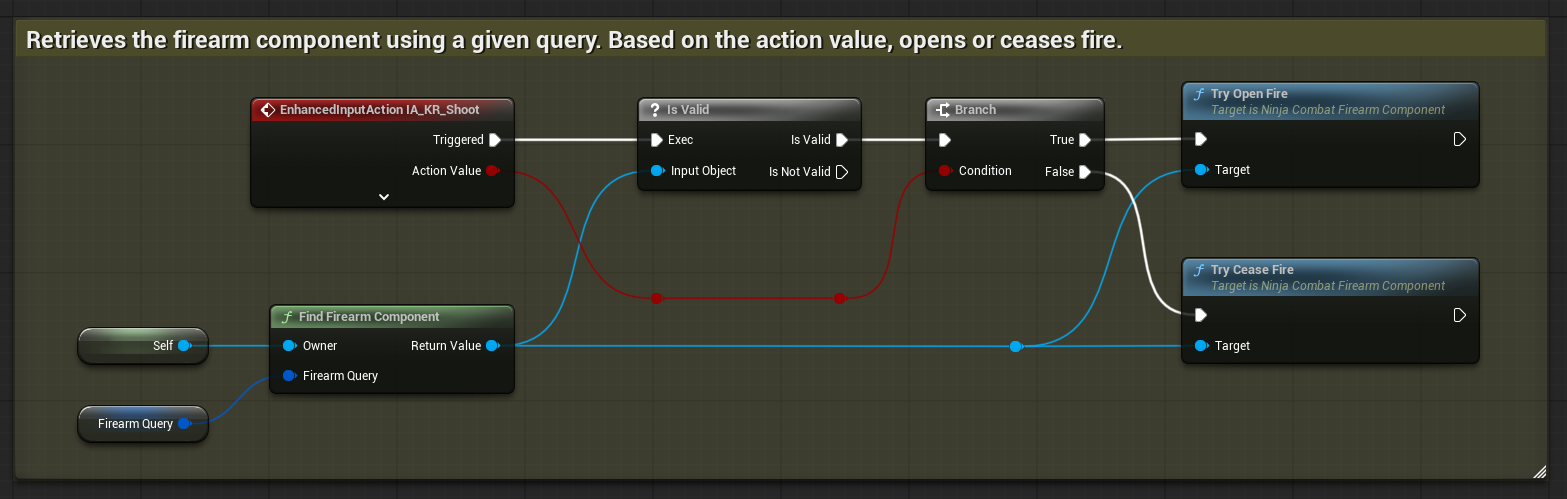
The component is also responsible for managing fire intent through its TryOpenFire and TryCeaseFire functions. These functions allow the player or AI to request that the firearm start or stop firing. When fire intent changes, the component can start or stop the Shoot Ability.
For players, an Input Action would normally include Pressed and Released triggers, which can be handled like the image below.
Ammo Storage Component
The Ammo Storage Component tracks ammunition available to the firearm owner. It allows firearm systems to query, consume, and restore ammunition without tying ammo directly to a single weapon actor.
This is useful for characters that can carry multiple firearms, share ammunition between weapons, or reload from a centralized ammo source.
Ninja Combat provides two variants of this component:
Ammo Storage | Description |
|---|---|
| Manages ammunition directly, using Gameplay Tags to match ammo entries with compatible firearms. |
| Resolves ammunition from Inventory items, using item stacks from compatible ammo items. |
Firearm Abilities
The Firearms module provides dedicated Gameplay Abilities for the main firearm actions.
The Shoot Ability handles firing logic, including ammunition checks, fire mode rules, hit-scan or projectile execution, and any related Gameplay Ability flow. This ability is usually activated or stopped by the Firearm Component, based on the current fire intent.
The Reload Ability handles reloading logic, usually by moving ammunition from the Ammo Storage Component into the active firearm according to the firearm's definition. This ability can be activated as usual, using Gameplay Tags or a Gameplay Event.
Together, these abilities keep firearm actions integrated with the Gameplay Ability System while allowing the firearm data and actor setup to remain modular.
Firearm Animations
The weapon owner can play Animation Montages to represent shoot and reload actions. These montages can use sections to support one-shot actions, automatic fire, and reloads that loop until they are finished or interrupted.
Shoot animations should have their main section named
Shoot. For automatic fire, the ability can keep looping this section while the weapon continues firing. The exit section should be separate, commonly namedEndorExit.Reload animations should have their main section named
Reload. For reloads that repeat part of the animation, such as shell-by-shell reloads, the montage can transition fromReloadinto aLoopsection. The exit section should be separate, commonly namedEnd.
Reload montages should also include the appropriate reload notify, such as Reload Ammo, at the point where ammunition should actually be committed.
Inventory Integration
Firearms have multiple integration points with Ninja Inventory, beyond the Weapon Management flow. Runtime firearm values can be provided by Inventory Item Fragments, and Ammo Storage can be managed through ammo item stacks.
For more information, see Combat and Inventory Integration.