Weapon Management
Ninja Combat can represent weapons as separate Weapon Actors managed by a Weapon Manager.
A Weapon Actor defines an individual weapon, such as a sword, shield, rifle, bow, or hybrid weapon. The Weapon Manager owns and organizes those weapons for a Pawn or Character, allowing Gameplay Abilities and combat systems to retrieve the correct weapon through Gameplay Tag Queries.
This setup is optional. A project can use Ninja Combat without Weapon Actors, such as for unarmed combat, creature attacks, or weapons modeled directly into the character mesh. When weapons need to exist as separate actors, the Weapon Management flow provides a flexible way to identify, attach, retrieve, and integrate them with attacks, blocking, inventory, and cosmetics.
Weapon Actors
A Weapon Actor is any Actor that implements CombatWeaponInterface.
This interface identifies the weapon and its owner, allowing the Combat System to query weapons without depending on a specific weapon class.
Function | Description |
|---|---|
| Returns the Actor that owns this weapon. |
| Returns the Gameplay Tags that identify this weapon in the owner's context. |
Default Weapon Actor
Ninja Combat provides NinjaCombatWeaponActor as the default Weapon Actor implementation.
This actor implements CombatWeaponInterface and can be used to represent melee weapons, ranged weapons, defensive weapons, or hybrid weapons. Projects can use it directly, create Blueprint subclasses from it, or create their own base weapon class that extends it.
Weapon Roles
Weapon Actors can participate in different combat flows depending on the interfaces, components, and data they provide.
Role | Description |
|---|---|
Melee Weapon | Used as the source for melee scans, trails, and melee impact data. |
Ranged Weapon | Used as the source for ranged attacks, projectile data, muzzle locations, or other ranged behavior. |
Defensive Weapon | Used by defensive abilities, such as blocking, parrying, or shield-based reactions. |
Hybrid Weapon | Supports more than one role, such as a rifle with a bayonet or a shield that can also bash. |
This page focuses on how Weapon Actors are identified and managed. For attack-specific behavior, see the dedicated pages for Melee Combat and Ranged Combat.
Weapon Manager
The Weapon Manager is the component responsible for managing the weapons available to a combatant.
It is usually added to any Pawn or Character that can hold, equip, spawn, or retrieve Weapon Actors during gameplay. Gameplay Abilities can then ask the Weapon Manager for a weapon matching a Gameplay Tag Query.
The Weapon Manager is the main bridge between Weapon Actors, Gameplay Abilities, and optional Inventory integration. Once added to a combatant, it should be provided via GetWeaponManagerComponent, from the CombatSystemInterface.
For more information, check the Combat Components page.
Weapon Manager Interface
Weapon Managers are defined by CombatWeaponManagerInterface.
Any Actor Component implementing this interface is considered a valid Weapon Manager. The interface exposes GetWeapon, which allows other systems to retrieve a weapon using a Gameplay Tag Query.
Function | Description |
|---|---|
| Returns a weapon matching the provided Gameplay Tag Query. |
Weapon Manager Components
Ninja Combat provides multiple classes for different levels of weapon management.
Component | Purpose |
|---|---|
| Abstract base class for Blueprint or C++ Weapon Manager implementations. Useful when different character types need different weapon managers. |
| Default concrete implementation. Supports default weapons, socket mapping, weapon lookup, and adding or removing weapons. |
A common project setup is to define the Weapon Manager on an abstract character class, then choose a concrete implementation in subclasses.
For example, an AI character might use the default Weapon Manager, while a player character might use an Inventory-aware Weapon Manager provided by a Combat and Inventory integration.
Weapon Setup Model
The default Weapon Manager uses three pieces of information to manage Weapon Actors.
Item | Purpose |
|---|---|
Weapon Class | Defines which Weapon Actor class should be created or managed. |
Socket Name | Defines where the weapon should be attached on the combat mesh. |
Weapon Tags | Defines how abilities and queries identify the weapon. |
This means a weapon can be spawned, attached to the correct socket, and later retrieved by Gameplay Abilities without hard references to a specific actor instance.
For example, a melee ability might request a weapon tagged as a sword. A ranged ability might request a weapon tagged as a rifle.
Default Weapons
The default Weapon Manager can instantiate weapon classes when it initializes.
These Default Weapons are useful for characters that always start with the same weapon set, such as enemies, companions, or simple playable characters. When initialized, each default weapon is created and attached to its configured socket.
For more dynamic equipment flows, weapons can also be added or removed during gameplay.
Attached Weapon Detection
Weapon Actors that are deliberately spawned and attached to the combatant can be detected and registered by the Weapon Manager.
This is useful when another system creates or attaches the weapon first, but the Combat System still needs to retrieve it later through the Weapon Manager.
To scan for attached Weapon Actors, use FindAttachedWeapons.
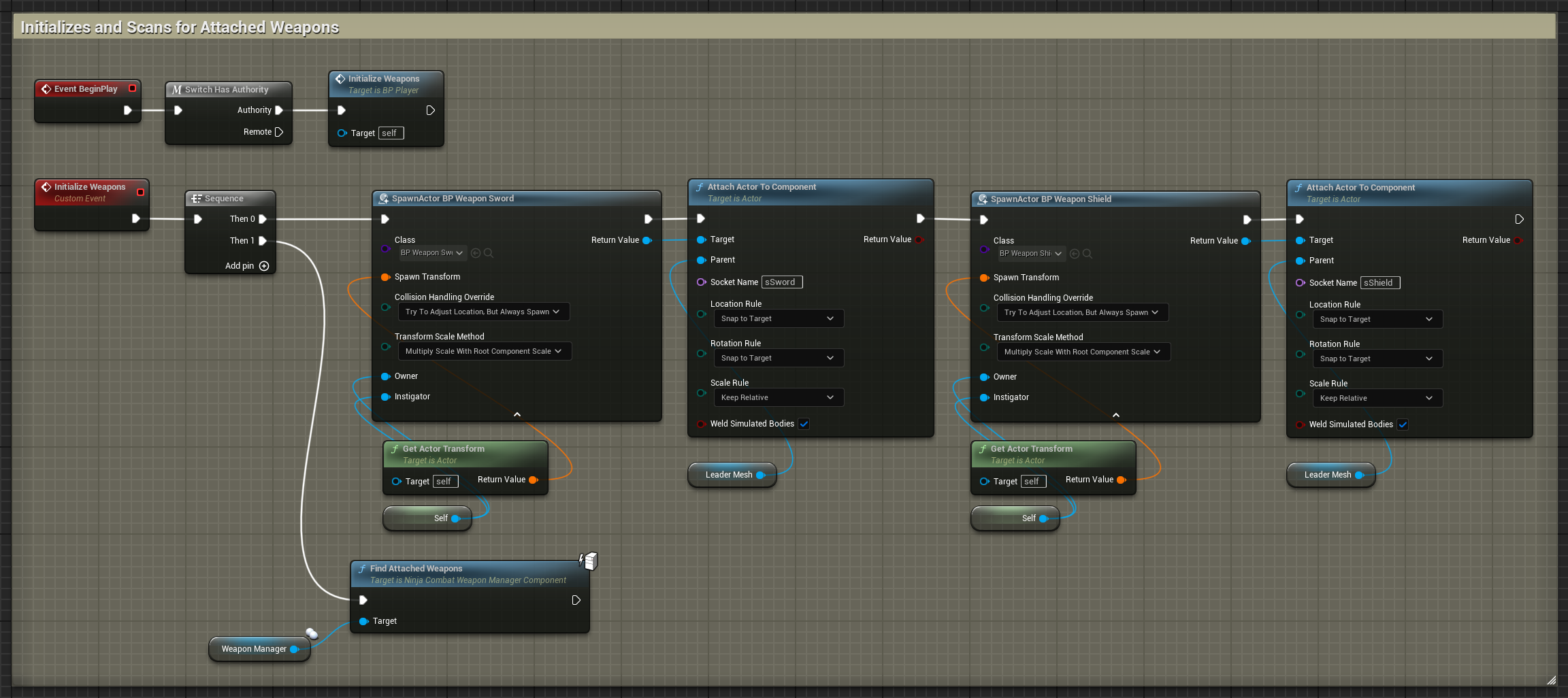
Managing Weapons
The default Weapon Manager provides functions to add, remove, and retrieve weapons.
Function | Purpose |
|---|---|
| Adds an existing weapon instance and attaches it to its configured socket. |
| Instantiates a weapon class and attaches it to its configured socket. |
| Removes a weapon instance from the weapon collection. |
| Removes the weapon instance returned by a Gameplay Tag Query. |
| Retrieves a weapon matching a Gameplay Tag Query. |
Weapon Cosmetics
Weapon and projectile impacts are handled through Gameplay Cues.
The default Weapon Actor includes a Combat Cosmetics Component, which can handle audio effects, particle effects, camera shakes, and surface-specific impact cosmetics. This component also integrates with the Asset Manager, supporting soft references and loading on demand when applicable.
Weapons and projectiles can define default impact cosmetics directly. They can also use a Data Table based on CombatImpactCosmeticsTableRow to select different effects based on the Physical Material of the hit surface.
Column | Description |
|---|---|
| Should match the Physical Material asset name, such as |
| Particle effects played for the given surface. |
| Sound effects played for the given surface. |
| Camera shake played for the given surface. |
Inventory Integration
The Weapon Manager is the main bridge between Ninja Combat and inventory-driven equipment.
When using Ninja Inventory, Weapon Actors can be represented as Equipment Actors, allowing equipment ownership and combat retrieval to stay connected.
In that setup, the Inventory system controls equipment ownership, while the Combat System retrieves usable weapons through the Weapon Manager interface.
For more information, see Ninja Inventory and Combat and Inventory Integration.