Interaction System
The Interaction System coordinates how an Interaction Source (player or AI) discovers and engages Interaction Targets placed in the world. Targets declare available interactions via Smart Objects and Gameplay Behaviors, while the source detects/maintains candidates, applies focus using strategies like distance to the instigator or camera aim.
Eventually, the Interaction Source fires a Gameplay Ability that retrieves the target's Smart Object and selected behavior. The source then runs a State Tree that supports multiple possible behaviors, such as orchestrate movement/rotation, animation, timing, and effects, ultimately triggering the behavior on the target and producing a clear interaction outcome.
Key Participants
The system is built around two roles: the Interaction Target and the Interaction Source.
- Interaction Targets
The Interaction Target is built on two frameworks: Smart Objects and Gameplay Behaviors. It introduces specialized logic and flows, integrated with other parts of the Interaction System. The target is represented by the presence of an Interaction Target Component.
- Interaction Source
The Interaction Source captures and stores available Interaction Targets for a pawn or character. Once captured, these targets can be focused, making them eligible for the Interaction Flow. The source is represented by the presence of an Interaction Manager Component.
Flow Overview
The following steps are involved in the interaction flow:
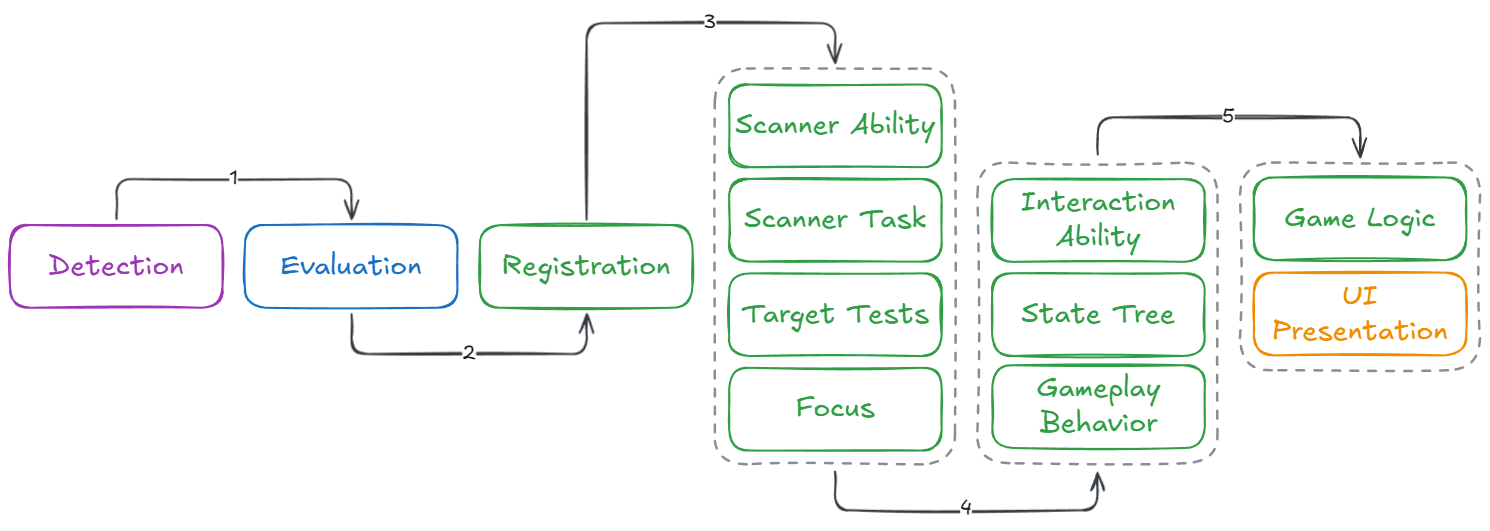
Detect: The Interaction Source registers nearby targets and becomes aware of potential interactions.
Accept: A target accepts the source only if it offers a compatible interaction.
Scan & Focus: When the first target is registered, the source begins scanning and applies focus to the best candidate. If no targets remain, scanning halts.
Request: From an appropriate Gameplay Event, the source sends an interaction request to a Gameplay Ability, packaging the chosen target's Smart Object and the desired Behavior.
Execute: The Execute Interaction ability bridges the source and target, retrieving the correct behavior configuration from the Smart Object.
State Tree Orchestration: The source runs a State Tree to handle movement/rotation, animation, timing, and other orchestration steps, including actually triggering the interaction behavior.
Outcome: The target's behavior logic runs to completion (or cancellation), producing the interaction outcome.