Interaction Source
An Interaction Source (also called an Interaction Instigator) is an actor, most often a pawn or character, that detects an Interaction Target and deliberately initiates an interaction with it.
Interaction Sources are powered by two Unreal Engine frameworks: State Trees and the Gameplay Ability System. At the center is the Interaction Manager Component, which ties these frameworks together, coordinating detection, validation, and execution, while exposing the functionality required by Ninja Interaction.
Interaction Manager Component
The UNinjaInteractionManagerComponent is the core component that must be added to any actor intended to detect interaction targets and initiate interactions. It serves as the backbone of the Interaction Source and has the following responsibilities:
Manage the list of known interaction targets, typically detected through dedicated collision components.
Perform scans for eligible targets using the Gameplay Ability System, allowing them to be focused and then interacted with.
Track interaction states, including when a target is registered, focused, or actively interacting.
Execute the interaction logic defined by the target through its assigned State Tree asset.
The component exposes several events you can bind to in order to track when interactable actors are detected, focused, or interacted with.
Event | Description |
|---|---|
| Fired when an interactable actor is detected and registered. |
| Fired when an interactable actor is no longer detected and is unregistered. |
| Fired when an the focus state changes for a registered target. |
| Fired when an the interaction state changes for a focused target. |
The UNinjaInteractionManagerComponent also exposes several Blueprint-accessible functions used to query the actor's awareness of interaction targets and to control the interaction flow.
Function | Description |
|---|---|
| Retrieves a summary of the current interaction, if any. |
| Returns all interaction targets currently registered with this manager. |
| Returns all interaction targets currently eligible to be focused. |
| Returns all interaction targets currently being focused. |
| Checks if the given actor is registered as an interaction target. |
| Checks if the given component is registered as an interaction target. |
| Checks if there is line-of-sight to the given interaction target component, even if it is not registered. |
| Applies focus to a specific interaction target, setting the focus state from |
| Removes focus from a specific interaction target, setting the focus state to |
| Starts an interaction based on a given request. Returns the activation result. |
| Commits the current interaction, if one is in progress. |
| Attempts to cancel the current interaction, optionally providing a Gameplay Tag that represents the cancellation reason. |
Collision Components
On initialization, the Interaction Manager Component will search the owning actor for specific collider components (UShapeComponent) that act as the entry point for detecting Interaction Targets.
Two types of colliders can be configured: the Scan Collider, used to register active targets and the Focus Collider, optionally used to apply focus based on proximity.
Interactable Scan Collider
Required. Must be present on each interaction source actor.
A shape component (commonly a box or sphere) used to register interaction targets so they can later be focused and interacted with.
This collider must be identified by the Component Tag
Interaction.Component.InteractableScan.This collider's Object Type should be
InteractionObject, created during the collision setup.
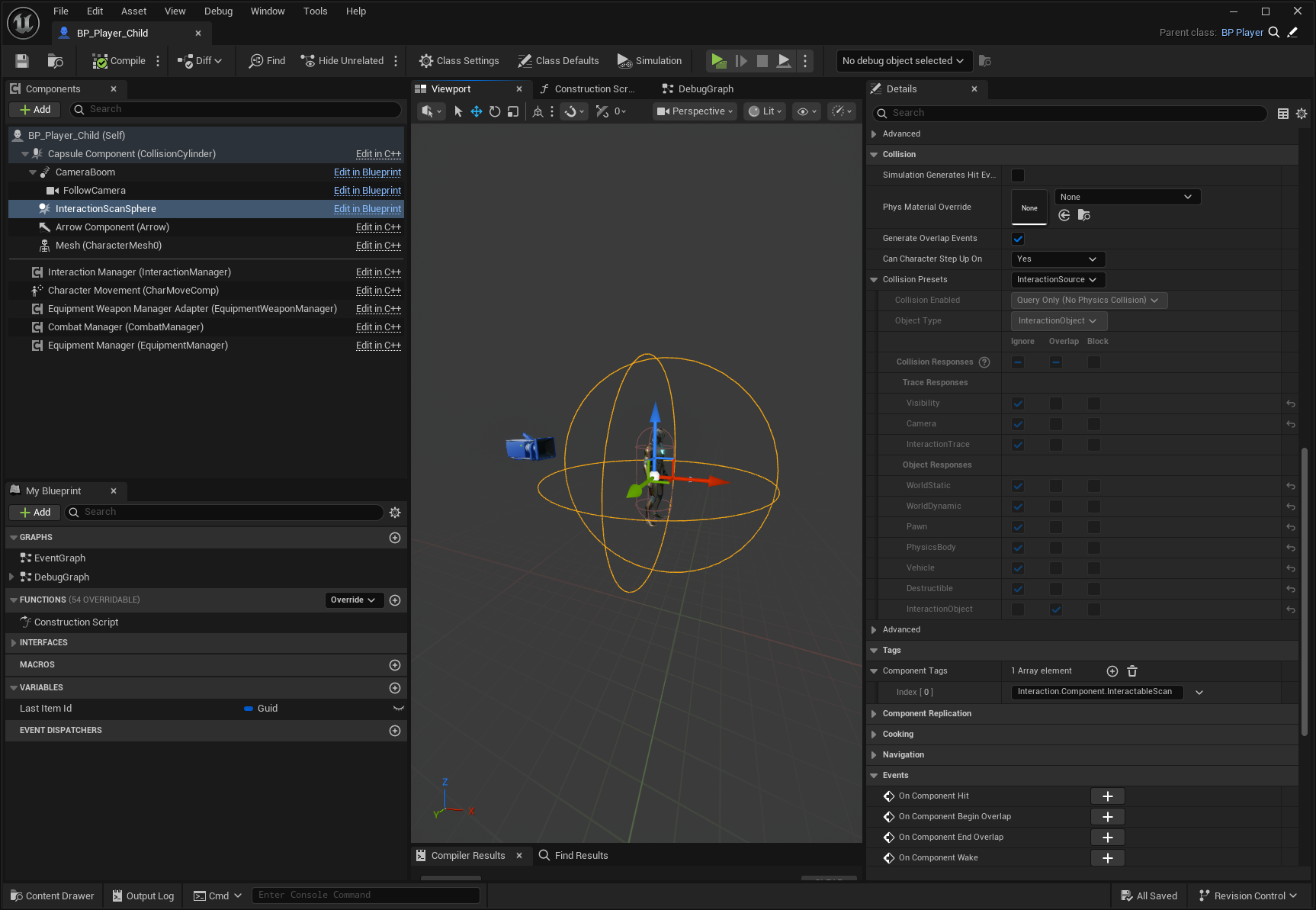
Interactable Focus Collider
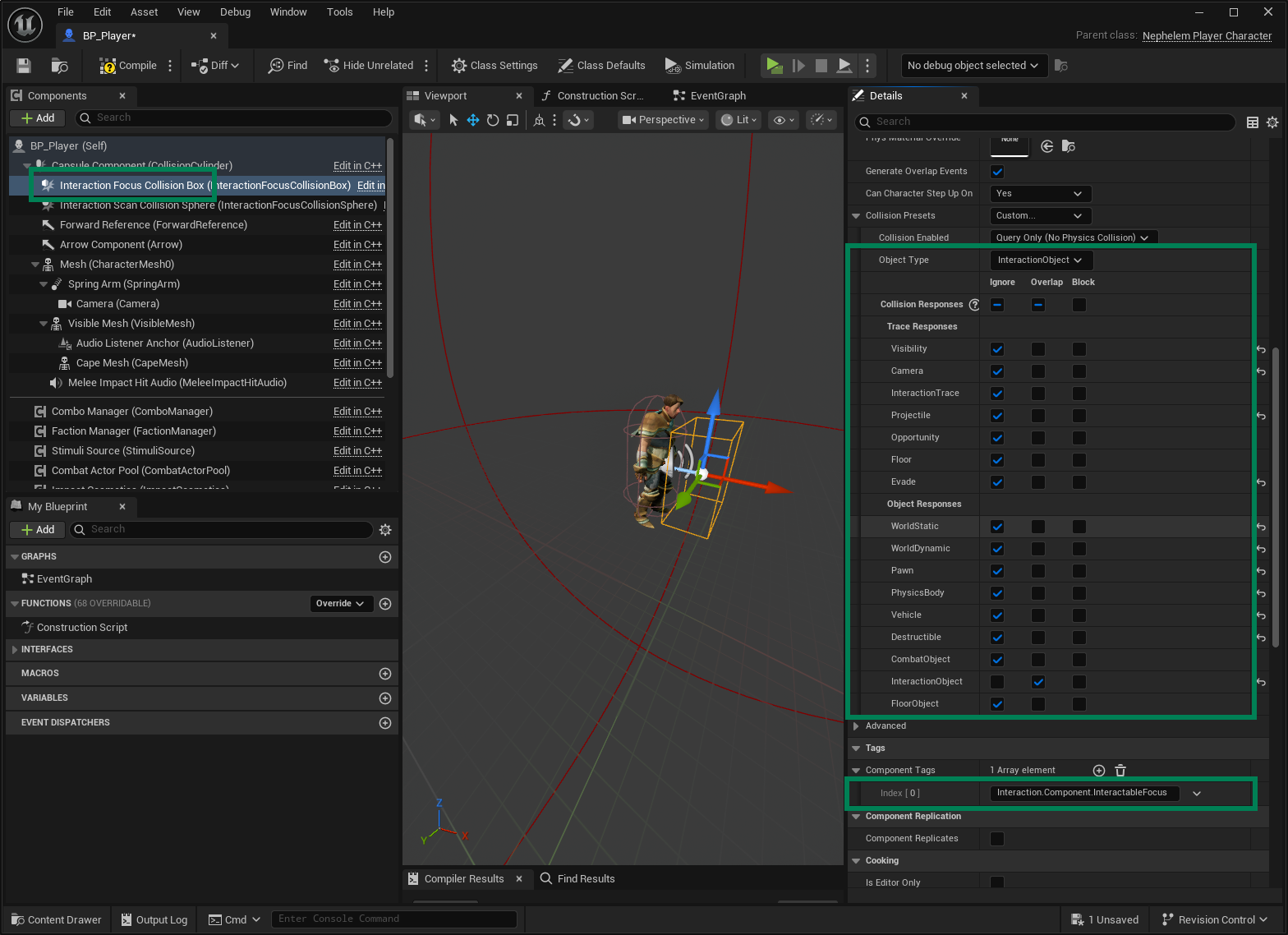
Optional. Required when focus is determined by proximity.
Usually, a smaller shape component used when interaction targets should become eligible for focus purely by proximity.
This allows targets to be detected based on the source being within range, so it can be ignored if you are using camera traces to apply focus.
This collider must be identified by the Component Tag:
Interaction.Component.InteractableFocus.Once again, this collider's Object Type should be
InteractionObject.
Once the first interactable actor is detected by the Interactable Scan Collider and registered, a Gameplay Event is fired. This event triggers the Find Interactable Actor ability (and its variations), which performs the actual scanning and processing of all available targets through the accompanying Interaction Search Task.
Similarly, when all registered targets are removed, another Gameplay Event is fired to interrupt the ability (and task) execution, ensuring the system halts when no interactable targets are present.
Interaction Abilities
The interaction system provides two Gameplay Abilities that must be granted by default to any actor serving as an Interaction Source (Instigator). These abilities are responsible for detecting, selecting, and executing interactions.
UInteractionAbility_FindInteractableActor: Scans the list of registered targets and, based on the provided Task class, selects the best candidate for focus or interaction.UInteractionAbility_ExecuteInteraction: Executes the selected interaction by bridging communication between the source and the target components.
The dedicated ability pages will cover these in detail, including how to customize or extend their behavior. For now, ensure that both abilities are added to your actor's Ability System Component by default, so they are always available when the Interaction Manager triggers its events.
Interaction Target States
From the Interaction Manager's perspective, a registered Interaction Target can exist in a few possible Focus States, and once focused, transition into a series of Interaction States.
Focus States
State | Description |
|---|---|
None | The target is registered, but no focus is applied to the target. |
Eligible | The target passed a pre-requisite criteria (e.g. it's colliding with the proximity box) and is ready to receive focus by a "focus event". |
Focused | The target received a focus event from the Inventor Manager (e.g. closest to the player, or aimed at by the player camera) and can accept an interaction. |
Interaction States
When a target reaches the Focused state, it becomes eligible for interaction. At that point, the following states may apply:
State | Description |
|---|---|
None | No interaction is in progress. |
Started | An interaction has been started. Immediate interactions will often skip this state. |
Commited | The target has received the outcome of the interaction, but the manager may still be executing it (e.g., an animation is still playing). |
Finished | The interaction has completed successfully. |
Cancelled | The interaction was cancelled before completion. |
Configuring an Interaction Source
To set up an Interaction Source (instigator), you'll need to combine collision, abilities, and the interaction manager into a working flow. At a high level, this involves three main tasks:
Add the Interaction Manager Component to your pawn or character, making it the backbone for detecting and managing interaction targets.
Configure the Collision Components (scan and optional focus colliders) so the manager can register and track interaction targets in the world.
Ensure the actor's Ability System Component receives the required Interaction Abilities, so it can scan for targets and execute interactions.