Inventory Containers
Inventory Containers represent logical sections of the inventory, used to store items. Each container defines its own rules, structure, and behavior, enabling modular and scalable inventory systems.
A container is implemented by the following objects:
Container Data Asset: Primary information about the container.
Container Layout: Position and Spatial logic for items added to the container.
Container Instance: Individual runtime logic, persistence and data replication.
Container Data Asset
Containers are defined by a Primary Data Asset, and as such, it must be added to the Asset Manager configuration as covered during the Asset Manager setup.
The Container Data Asset itself is straightforward and contain few, but important properties.
Property | Description |
|---|---|
| Localized name for the container, shown in UI or tooltips. |
| Optional icon representing the container visually. |
| Describes the container's traits using tags. Used by tag queries to filter or select containers during gameplay. |
| Class used for the runtime container instance, once added to an Inventory Manager. Allows custom container logic per asset. |
| Defines how items are positioned and stored. Handles persistence, spatial organization and defines the position data type. |
| Determines sorting or selection priority among containers. Lower values indicate higher priority when comparing containers. |
| Defines what items can be added to this container. Evaluated against item data or tags at runtime. |
You can create a container Data Asset either extending from NinjaInventoryContainerDataAsset, or directly from the contextual menu in your content browser, under the Ninja Bear Studio > Ninja Inventory category and selecting Container Definition.
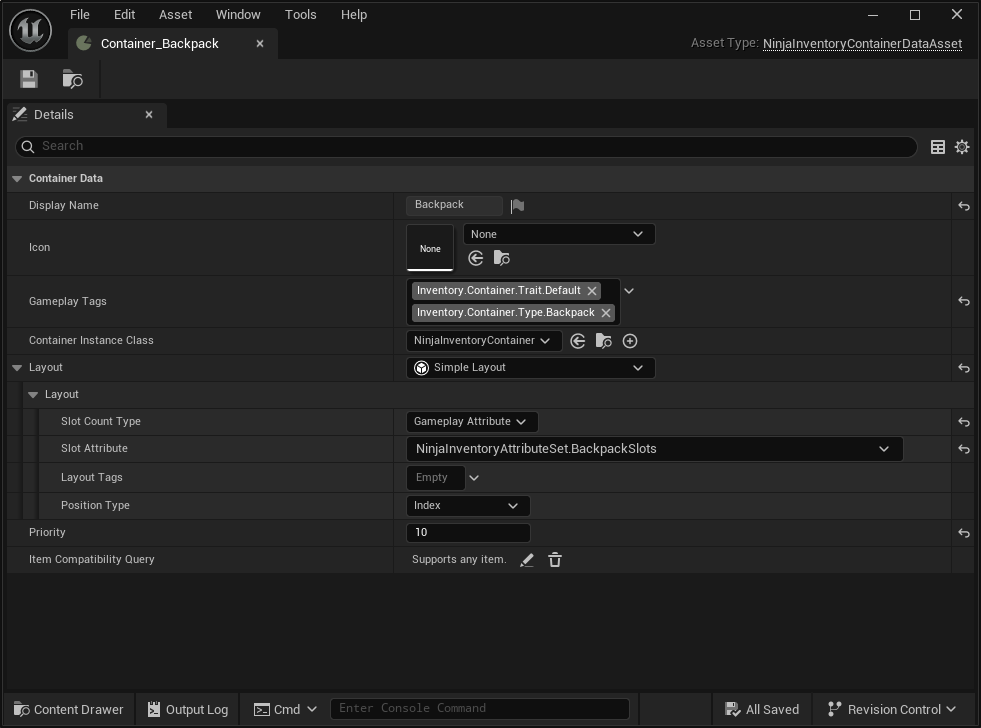
Container Layout
Each container uses a layout, which defines how item positions are tracked, what spatial rules apply, and how data is persisted.
This abstraction allows containers to operate in very different ways (e.g., grid-based, slot-based, or list-based) while still sharing the same core item logic and validation pipeline.
Layouts are stateless objects shared among all container instances created from the same Data Asset. While each layout can have its own exclusive properties, every layout defines at least the following:
Property | Description |
|---|---|
| Gameplay Tags that this layout adds to the container. |
| The type of position used by this layout. |
Choosing the correct position type is essential, as it defines how items are stored and retrieved from container instances.
Index: Represents a single numeric index. Ideal for list-like containers or sequences and also grids without dimensional support.
Grid: Represents a 2D coordinate (X, Y). Ideal for spatial inventories where item dimensions are relevant to the presentation grid.
Single: Allows only one item. Ideal for simple slot-based systems like equipment containers.
The system provides several built-in layouts you can use right away. You can also implement your own by subclassing UNinjaInventoryContainerLayout. For more information on specific layouts, see their dedicated pages.
Container Instances
When a container is added to an Inventory Manager, it becomes a container instance, represented by UNinjaInventoryContainer.
This runtime object is responsible for:
Storing the actual item references.
Providing query access to stored items.
Managing updates to layout and internal state.
Participating in save/load operations.
Each container instance is assigned a unique GUID, which can be used to query, reference, or remove it dynamically at runtime via the Inventory Manager.
For advanced use cases, you can override the behavior of container instances by specifying a custom class in the container's Data Asset. This allows you to extend or replace native runtime functionality to fit your game's specific requirements.