Openable Actor
The Openable Actor provides a standardized way to create interactive objects such as doors, chests, containers, and panels. It supports the following interaction types:
Interaction Type | Description |
|---|---|
| Opens the actor, triggering its associated cosmetic behavior. |
| Closes the actor, restoring its closed cosmetic state. |
| Attempts to unlock the actor by resolving a key through a configurable and flexible key resolver class. |
This system is fully replicated, extensible, and decoupled from any inventory implementation.
Internal States
The ANinjaInteractionOpenableActor maintains two replicated states: Locked/Unlocked and Open/Closed. Each state change triggers a corresponding cosmetic Blueprint event:
Function | Description |
|---|---|
| Called when the actor enters the locked state. |
| Called when the actor enters the unlocked state. |
| Called when the actor becomes open. |
| Called when the actor becomes closed. |
To ensure proper state synchronization across the network, the actor uses:
Multicast RPCs for live cosmetic transitions (e.g., playing a door-opening animation).
Replication for late joiners, ensuring they immediately snap to the correct final state without seeing the transition.
You only need to implement the Apply functions that your specific actor requires. For example, a chest that opens and closes may only implement ApplyOpenState and ApplyClosedState. A Blueprint setup for such an actor could look like this:
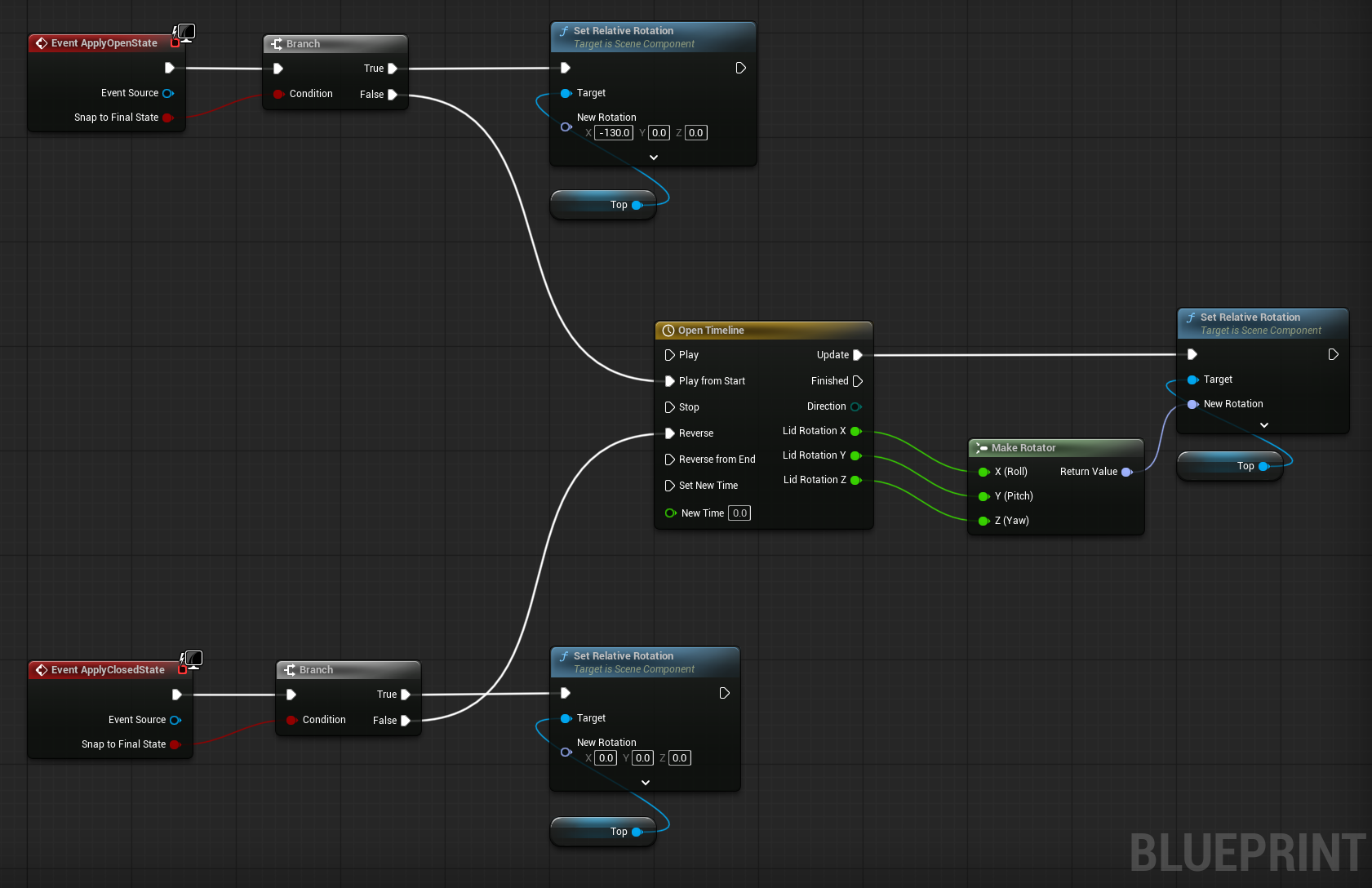
Each cosmetic event provides a boolean parameter: SnapToFinalState. This flag determines whether the transition should:
Happen instantly (typical for late joiners receiving a replicated value), or
Be animated (e.g., via a timeline) for players who witnessed the interaction in real time.
Gameplay Behavior
You can introduce your own gameplay behaviors, related to the open or close events, by extending these functions, in Blueprints or C++. When doing so, make sure to call their parent/super versions to keep the original behavior.
These events are only invoked in the authoritative version and should not be used for cosmetics. However, you might want to trigger client RPCs to execute things such as opening user interface windows (e.g. inventory items).
Function | Description |
|---|---|
| The actor has been open on the server and the state will replicate. |
| The actor has been closed on the server and the state will replicate. |
Properties
The following properties will adjust this actor's behavior, related to its internal states:
Property | Description |
|---|---|
| Determines if the actor begins in a locked state. |
| If enabled, attempting to Open will automatically try to unlock the actor using a key. |
| Allows or disallows "Close" interactions. |
| Establishes a toggle behavior, allowing interactions to alternate between "open" and "closed" states. |
| If enabled and greater than zero, closes an open actor automatically, after the set interval. |
And the following properties will adjust the actor's behavior, related to the key resolution:
Property | Description |
|---|---|
| A Gameplay Tag Query used to find a matching key in the instigator's inventory. |
| A class that implements the logic for resolving keys. Defaults to a reflection-based resolver for Ninja Inventory, but can be overridden by project-specific resolvers. |
Key Resolution and Auto Unlocking
Locked Openable Actors can be configured to accept keys as a way to transition into the unlocked state.
Instead of depending on a specific inventory or item system, the actor delegates the entire " find and validate a key " process to a dedicated Key Resolver. This keeps the actor fully decoupled: it does not know where keys come from, how they are stored, or what rules your game uses to consume them.
A Key Resolver is any class derived from UNinjaInteractionKeyResolver. It exposes a single function that receives three parameters: the Instigator Controller, the Unlockable Actor, and a Key Query. It returns true if unlocking is allowed.
The default Key Resolver integrates with Ninja Inventory. It searches for an item configured as a key and, if found, unlocks the actor (including optional key consumption defined by the item fragment).