Attack Magnitudes
Combat Abilities responsible for applying primary Gameplay Effects, such as damage, provide ways to customize magnitudes in their outgoing effects.
Default Magnitudes
By default, Attack Abilities collect relevant data and automatically apply a pre-defined set of magnitude data tags.
Data Tag | Description |
|---|---|
| Current combo count, which can be used to scale damage across larger combos. |
| Base damage, retrieved from the Melee or Projectile interfaces. |
| Poise damage, retrieved from the Melee or Projectile interfaces. |
Cast Abilities follow the same pattern, but only when the effect is applied directly by the ability—such as when using TargetingSystem or WaitForConfirmation targeting modes.
Data Tag | Description |
|---|---|
| Number of targets affected by the cast. |
Custom Combat Magnitudes
If you need to introduce new magnitude values into your Attack or Cast abilities, you can override the GetAdditionalCombatMagnitudes function.
This allows you to extend or modify the set of magnitudes applied to outgoing Gameplay Effects.
Setting Custom Magnitudes
Open your Gameplay Ability that extends an Attack or Cast ability.
Implement
GetAdditionalCombatMagnitudesand return any magnitudes that should be added or modified in the outgoing effect.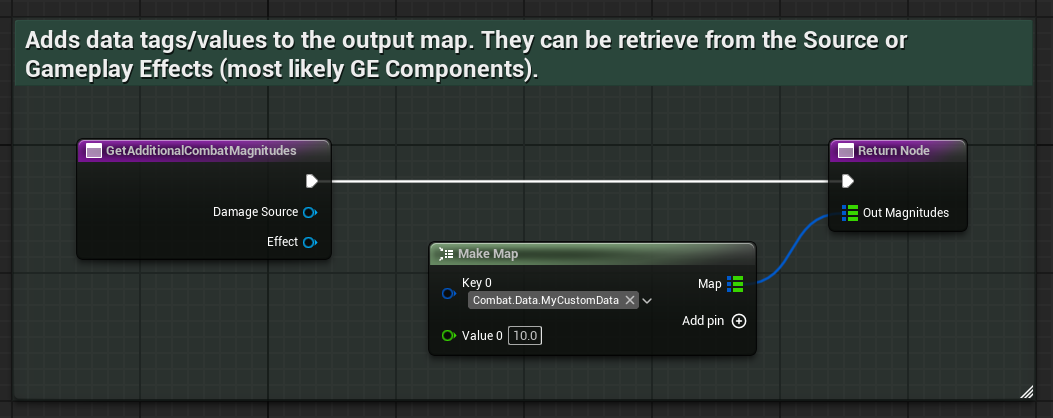 void UMyCombatAbility::GetAdditionalCombatMagnitudes_Implementation(const AActor* DamageSource, const UGameplayEffect* Effect, TMap<FGameplayTag, float>& OutMagnitudes) { const float ExtraData = Effect->FindComponent<UMyCustomDataComponent>()->GetSomeExtraData(); OutMagnitudes.Add("Combat.Data.MyCustomData", ExtraData); }