Adding Default Items
Items can be added to the Inventory through different sources, such as a Default Item Data Structure. It uses the Item Data Asset and optional Fragment Memories to represent the item being added to the inventory.
Adding a Default Item
Adding an Item to the Inventory
From an appropriate event, access the Inventory Manager and call
AddItem.Create a new Default Item by setting the Item Data Asset and adding desired Fragment Memories (e.g., Stack).
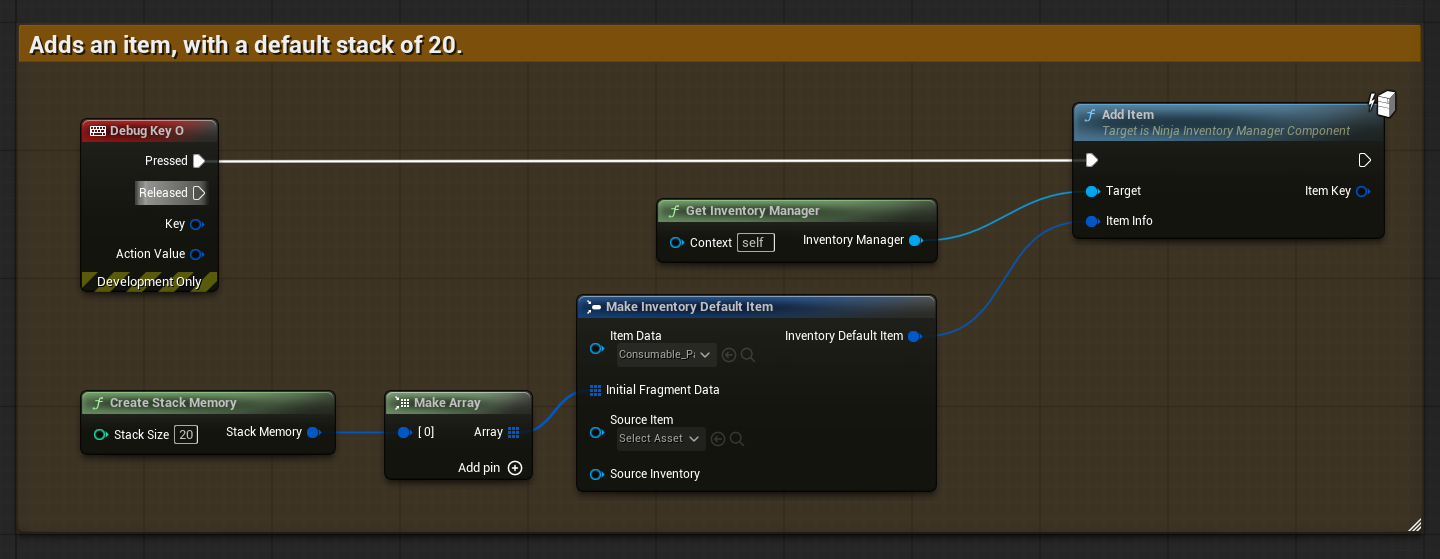 void UInventoryExamples::AddItem(const UNinjaInventoryItemDataAsset* ItemData, int32 StackSize) { TArray<FInventoryDefaultItemMemory> DefaultMemories; FInventoryDefaultItemMemory StackMemory = UNinjaInventoryFunctionLibrary::CreateStackMemory(StackSize); Memories.Add(StackMemory); FInventoryDefaultItem DefaultItem = UNinjaInventoryFunctionLibrary::CreateDefaultItem(ItemData, DefaultMemories); UNinjaInventoryManagerComponent* InventoryManager = GetInventoryManager(); FGuid ItemId = InventoryManager->AddItem(DefaultItem); if (ItemId.IsValid()) { UE_LOG(LogTemp, Log, TEXT("Item added!")); } }
Event Tracking
In some cases, it might be useful to react to items being added to the inventory. In those cases you can use a callback with the new item information, or the global Item Event.
Both the callback and the item event are triggered after the item has been processed by the queue and successfully added to the inventory.
Event Type | Scope | Notes |
|---|---|---|
Callback | Authoritative only | Per-item, step-by-step registration |
Item Event | Authoritative + Local | Broadcast-based, includes additions |
Adding Items with Events
Retrieve the Inventory Manager and bind to the Item Event delegate.
Create your default item data structure and call
AddItemWithCallback.Connect your logic to both the Item Event and the Callback.
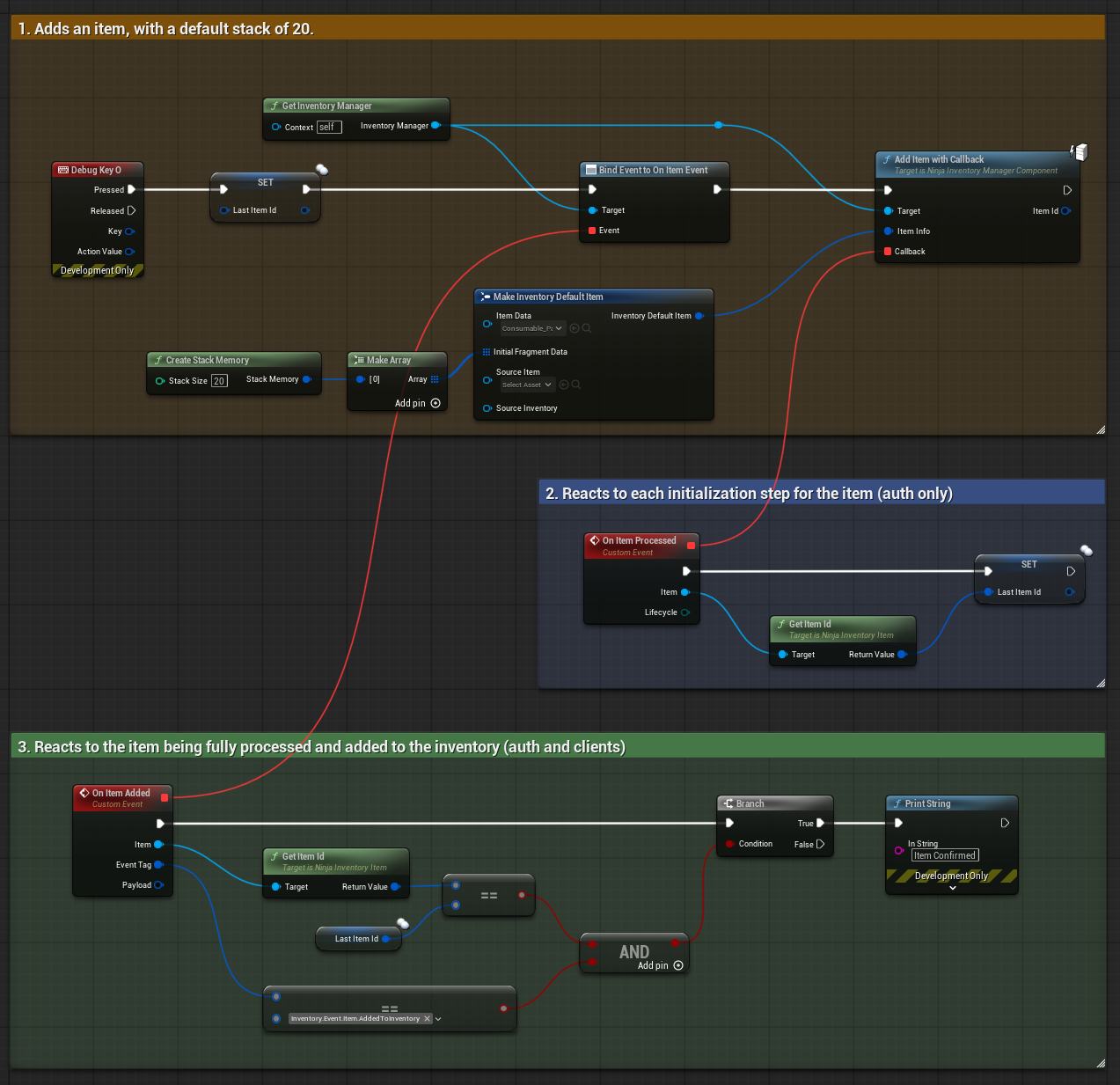 void UInventoryExamples::AddItem(const UNinjaInventoryItemDataAsset* ItemData, int32 StackSize) { TArray<FInventoryDefaultItemMemory> DefaultMemories; FInventoryDefaultItemMemory StackMemory = UNinjaInventoryFunctionLibrary::CreateStackMemory(StackSize); Memories.Add(StackMemory); FInventoryDefaultItem DefaultItem = UNinjaInventoryFunctionLibrary::CreateDefaultItem(ItemData, DefaultMemories); UNinjaInventoryManagerComponent* InventoryManager = GetInventoryManager(); InventoryManager->OnItemEvent.AddDynamic(this, &ThisClass::OnItemEvent); FInventoryItemInitializationCallback Callback; Callback.BindDynamic(this, &ThisClass::OnItemLifecycleChanged); FGuid ItemId = InventoryManager->AddItemWithCallback(DefaultItem, Callback); } // UFUNCTION void UInventoryExamples::OnItemLifecycleChanged(const UNinjaInventoryItem* Item, EInventoryItemLifecycle Lifecycle) { // Item changed the initialization state. } // UFUNCTION void UInventoryExamples::OnItemEvent(const UNinjaInventoryItem* Item, FGameplayTag EventTag, FInstancedStruct Payload) { if (EventTag == Tag_Inventory_Event_Item_AddedToInventory) { // Item was added to the inventory. } }