Fragment ViewModels
Fragment ViewModels expose specific item fragments to the user interface. They allow you to select only the data relevant for your widget and bind to it using the appropriate ViewModel type.
Configuration
Fragment ViewModels are bound to a single item using either SetItemInstance or SetItemView. These methods can also be used to reset or change the current item being observed.
All Fragment ViewModels should be created using the Inventory Resolver.
Dimensions
This ViewModel exposes data from the Dimensions Fragment, including the item's footprint and rotation state.
When combined with the base Item Widget classes, it will have the base item size set, which allows the ViewModel to correctly calculate the Width and Height considering the grid host.
If you are not using the base Item Widgets, you can still define the base size by calling SetBaseSize.
Field | Description |
|---|---|
| Indicates whether the item is currently rotated in its container. |
| Returns the item's width and height as a |
| Absolute width considering the Item Dimensions and the base dimensions. |
| Absolute width considering the Item Dimensions and the base dimensions. |
Once fully configured, the Width and Height values can be fed directly into a Size Box. These dimensions already take into consideration the rotation state so you don't need to worry about that.

Durability
This ViewModel exposes data from the Durability Fragment, allowing you to monitor an item's durability status and display appropriate UI feedback.
Field | Description |
|---|---|
| Indicates whether the item includes a Durability Fragment. |
| Returns |
| Indicates whether the item is broken (durability has reached zero). |
| The current durability value of the item. |
| The maximum durability this item can have. |
| Durability percent considering current/maximum. |
Dynamic Attribute
This ViewModel exposes a specific Dynamic Attribute. It's usually created by the Dynamic Attributes ViewModel, which is responsible for providing a list with all dynamic attributes assigned to an item.
When used in that context, the Creation Type should be set to Manual since the Dynamic Attributes ViewModel will be responsible for creating each instance.
This ViewModel exposes the following details:
Property | Description |
|---|---|
| Gameplay tag that uniquely identifies the attribute. |
| Current value for the attribute. |
| For ranged values, this is the minimum possible value. |
| For ranged values, this is the maximum possible value. |
| Value mode for this attribute (fixed or ranged). |
| The attribute name set in the Data Asset. |
| The attribute description set in the Data Asset. |
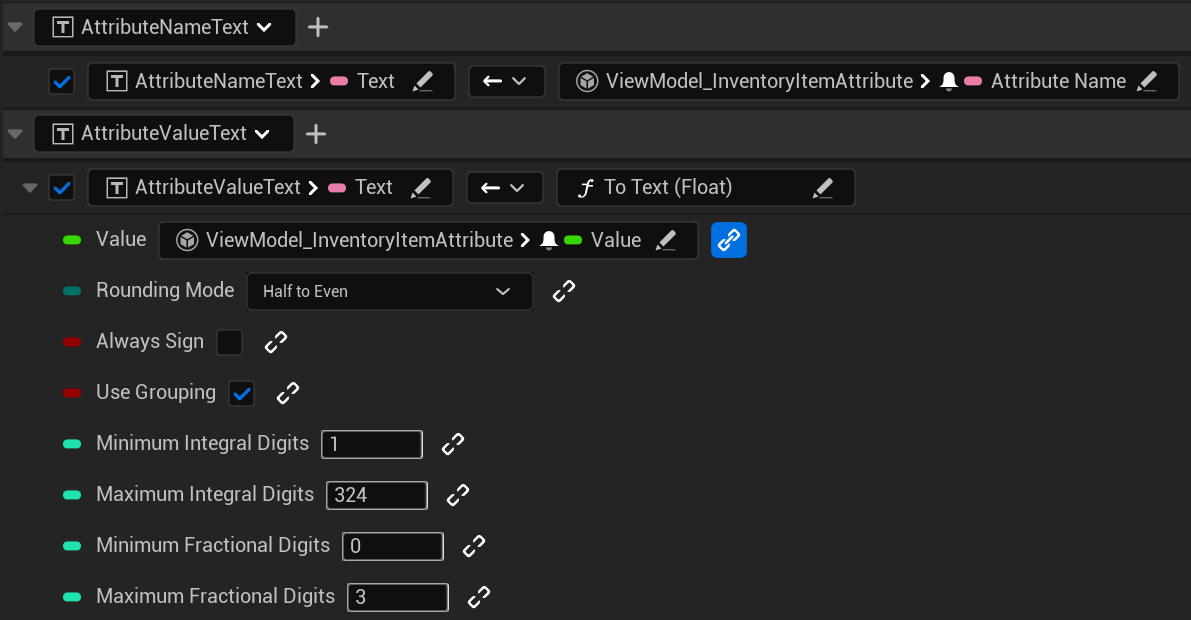
This ViewModel is most likely set to a single widget that simply represents one attribute. The most common use case would have bindings for the attribute name and its current value.
Dynamic Attributes
This ViewModel exposes all Dynamic Attributes assigned to an item, allowing them to be fully displayed, including relevant configuration details, in the user interface.
The ViewModel exposes the following fields:
Field | Description |
|---|---|
| Indicates whether the item includes any dynamic attributes. |
| Provides a list of dynamic attribute information. |
The GetDynamicAttributes function provides a list of Dynamic Attribute ViewModels. This means you can use this ViewModel with a ViewModel Extension, along with components such as a Vertical Box. The following image shows how the extension can be configured, pointing to a widget that represents a single attribute and its ViewModel.
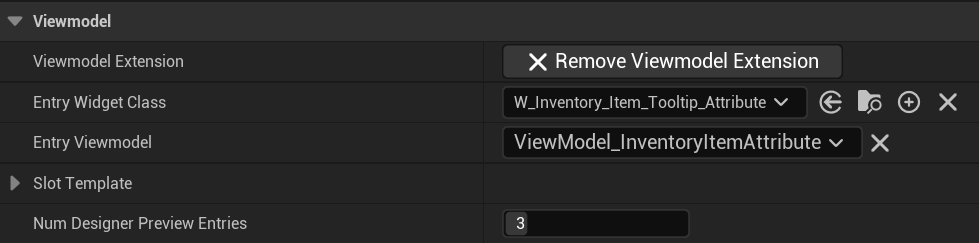
This will create an extension property in the widget, with a single SetItems function. You can bind the provided GetDynamicAttributes function to it, so all required attribute widgets are created and populated correctly.

Economy
This ViewModel exposes data from the Economy Fragment, allowing your UI to represent buy/sell permissions and pricing.
Field | Description |
|---|---|
| Indicates whether the item includes an Economy Fragment. |
| Returns |
| Returns |
| The per-unit price to buy this item. |
| The total buy price, including the current stack quantity. |
| The per-unit price to sell this item. |
| The total sell price, including the current stack quantity. |
Linked Container
This ViewModel notifies when an item is in a linked state, meaning the item is a mirror position, in a linked container, configured by the Linked Container Fragment.
Field | Description |
|---|---|
| Informs if the item is in a linked scenario. |
Using this ViewModel requires a reference container, which must be set by the Item ViewModel. This is a one-time binding that establishes which container the ViewModel should compare against when determining whether the item is currently linked.

Level
This ViewModel exposes data from the Level Fragment, allowing you to display and track an item's level progression.
Field | Description |
|---|---|
| Indicates whether the item includes a Level Fragment. |
| The current level assigned to the item. |
| The maximum level this item can reach. |
Nested Container
This ViewModel exposes data from the Nested Container Fragment, allowing you to access a container stored inside an item (e.g., a bag or box).
Field | Description |
|---|---|
| Returns the |
Quality
This ViewModel exposes data from the Quality Fragment, allowing your UI to reflect the item's rarity or quality visually and textually.
Field | Description |
|---|---|
| Indicates whether the item includes a Quality Fragment. |
| A gameplay tag that defines the item's quality (e.g., |
| Localized display text for the item's quality. |
| A display color associated with the item's quality level. |
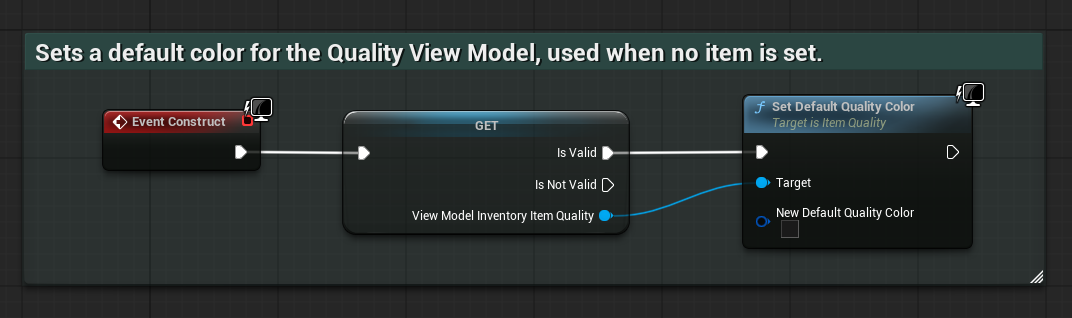
When using the Quality Color as a background or visual indicator, you may want to define a fallback color for when no item is assigned. By default, the color is set to transparent, but you can customize this by setting the Default Color property on the ViewModel.
Stack
This ViewModel exposes data from the Stack Fragment, allowing the UI to represent item quantities, limits, and stack display behavior.
Field | Description |
|---|---|
| Indicates whether the item includes stack data and if it should be shown. |
| The current quantity of the item in the stack. |
| The maximum number of items allowed in a single stack. |
| The maximum quantity allowed across the entire inventory. |
User Interface
This ViewModel exposes data from the User Interface Fragment, allowing your widgets to display localized text and icons for the item.
Field | Description |
|---|---|
| Localized name of the item, typically shown as the main label. |
| Localized category or grouping label for the item. |
| Localized description text, often used for tooltips or item details. |
| UI texture representing the item visually. |
Weight
This ViewModel exposes data from the Weight Fragment, allowing the UI to display item weight and calculate encumbrance effects.
Field | Description |
|---|---|
| Indicates whether the item includes a Weight Fragment. |
| The weight of a single unit of the item. |
| The total weight, factoring in the item’s current stack size. |