Spatial Layout
The Spatial Layout is a specialized container layout that supports 2D spatial positioning of items, enabling grid-based organization.
It is ideal for containers that can hold items of varying sizes (e.g., 1x1, 2x2, 2x3, 2x4, etc.), and it also supports item rotation, when enabled.
Layout Properties
The following properties control the grid layout:
Property | Description |
|---|---|
| The number of columns in the grid. Used for placement logic and UI layout. |
| The number of rows in the grid. Only used if |
| Algorithm used to test fit and item collisions. |
| Defines how the total number of usable slots is determined. Options include Property (fixed values) or Gameplay Attribute (dynamic). |
| A reference to a |
Position Type
This layout uses the Grid position type, where each item occupies a 2D coordinate on the container (starting at 0,0). The layout behaves like a matrix, with collision and fit checks performed across rows and columns.
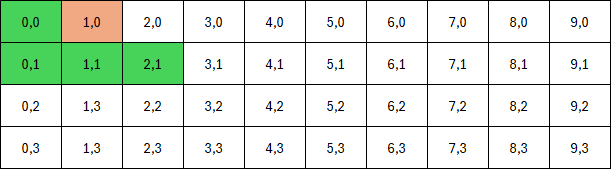
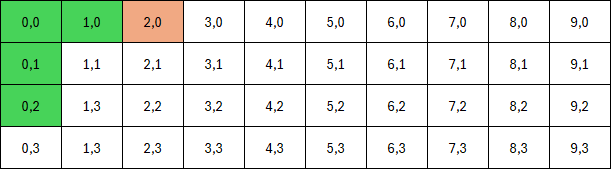
To better illustrate how items interact with the spatial grid, the following example shows two scenarios, in a 10x4grid.
Example 1: An L-shaped item and a 1x1 item are placed on the grid, on positions 0,0 and 1,0 respectively. The L-shaped item cannot rotate because the 1x1 item blocks one of its required cells.
Example 2: After moving the 1x1 item to a different position, 2,0, the L-shaped item can rotate freely. This demonstrates how the fit algorithm checks collisions against existing occupants and container bounds.
Slot Count Types
The layout supports two modes of determining total slots:
Fixed Property: The
WidthandHeightare set directly on the asset and remain constant.Gameplay Attribute: A runtime attribute defines the total number of slots. The layout uses
Widthand derivesHeightdynamically.
This enables both static containers (e.g. a small chest) and dynamic ones (e.g. a player’s bag scaling with level or strength).
Fit Algorithm
The spatial layout's fit algorithm decides whether an item can be placed at a candidate position given its size, rotation, and occupancy mask, while respecting container bounds and existing items. It's called by CanAcceptItemAtPosition and by search routines that try alternative slots when the first choice fails.
PerCell
This algorithm iterates each occupied cell of the item's mask, including rotation support, and tests that cell against the container grid.
Custom
Lets you plug in your own fit logic for special layouts or heuristics. Extend the layout and override the virtual TestWithCustomAlgorithm hook to implement your algorithm.