Ranged Attacks
Ranged Attacks are one of the core features of Ninja Combat. They are usually implemented using a combination of Animation Montages, Gameplay Abilities and Projectile Actors, applying specified Damage Effects on collision.
Ranged Weapon Interface
Any object, such as Pawns or Weapons, meant to execute ranged attacks must implement CombatRangedInterface. It defines the source mesh, from which a projectile will be launched.
This interface is designed in a way to support projectiles being launched from different source meshes, based on the socket that is being used.
Function | Description |
|---|---|
| Provides the mesh used to launch a projectile from a given socket. |
Projectile Interface
Projectiles are the main participants in the ranged combat. They are launched by the Attack Gameplay Ability, or any other ability designed to do so, and carry a pre-generated version of the Gameplay Effect that should be applied when they collide with targets.
Function | Description |
|---|---|
| Provides the projectile speed. Can be obtained from a Projectile Movement Component or other means. |
| Prepares any initial data before the projectile is launched. |
| Effectively launches the projectile. |
| Provides a Gameplay Effect applied when this actor collides with a target. Overrides the Gameplay Effect specified in the Ability if one is present. |
| Level used when instantiating the Damage Gameplay Effect. |
| Sets the pre-configured Gameplay Effect Handle used by the projectile. |
| Optionally provides a damage value magnitude set to the Gameplay Effect using |
| Optionally provides a poise value magnitude set to the Gameplay Effect using |
| Provides all actors that were hit by this projectile. |
| Defines a strength applied when physical reactions are enabled. |
| Invoked by the Damage System to render cosmetics from a registered impact, via the Gameplay Cue system. |
Projectile Actor
The Projectile Actor (NinjaCombatProjectileActor) is an abstract class that can be used as a base for all your projectiles. It fully implements the Projectile Interface, with built-in logic and exposed properties for easy configuration.
This implementation is based on the Projectile Movement Component implementation. It does not assume any specific type of visuals, so you can add a Static Mesh Component, Skeletal Mesh Component, Particle Effects and so on.
Configure a Projectile Actor
Create a new Blueprint based on
NinjaCombatProjectileActor.Add a projectile mesh, it can be a Static or Skeletal Mesh Component, depending on your weapon requirements.
In the Projectile Movement Component, adjust the speed to your liking, but
3000should be a good starting point.Configure any cosmetics in their appropriate slots.
The Default Projectile Actor has the following properties that can be used to adjust its behavior.
Property | Description |
|---|---|
| Determines how the projectile aims for targets when launched. |
| Max bounces allowed for the projectile. Zero means " no bouncing ". |
| The channel used to trace for target between frames. |
| Strength applied when a physical animation system is in use. |
The Aiming Mode supports the following options:
Forward: The projectile is launched forward, from its origin socket.
Targeting System: The projectile is launched towards a target collecting via a targeting preset, from the Gameplay Targeting System.
Location: The projectile is launched towards the location set by
SetInitialLocation, which should be called fromPrepareLaunch.
Prepare the Weapon for Projectiles
Open the Static or Skeletal Meshes used to represent your ranged weapons.
Place a socket where the projectile is positioned on launch. Make sure that this socket is rotated forward.
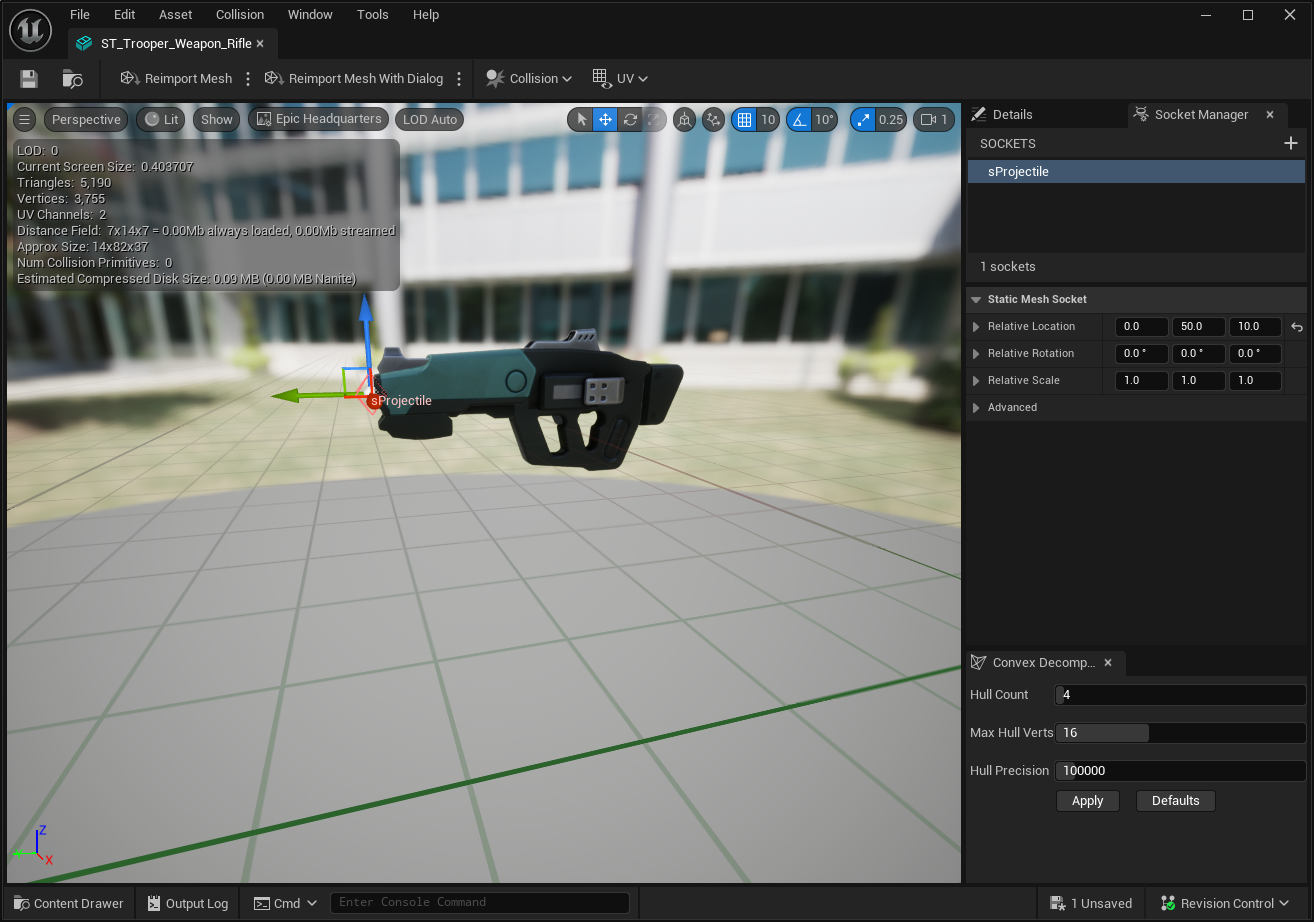
Configure a Ranged Weapon
Open the Rifle Weapon Actor, created in the Weapon Actors page.
Implement the
GetProjectileSourceMeshfunction, returning the Static or Skeletal Mesh that will be used when launching projectiles.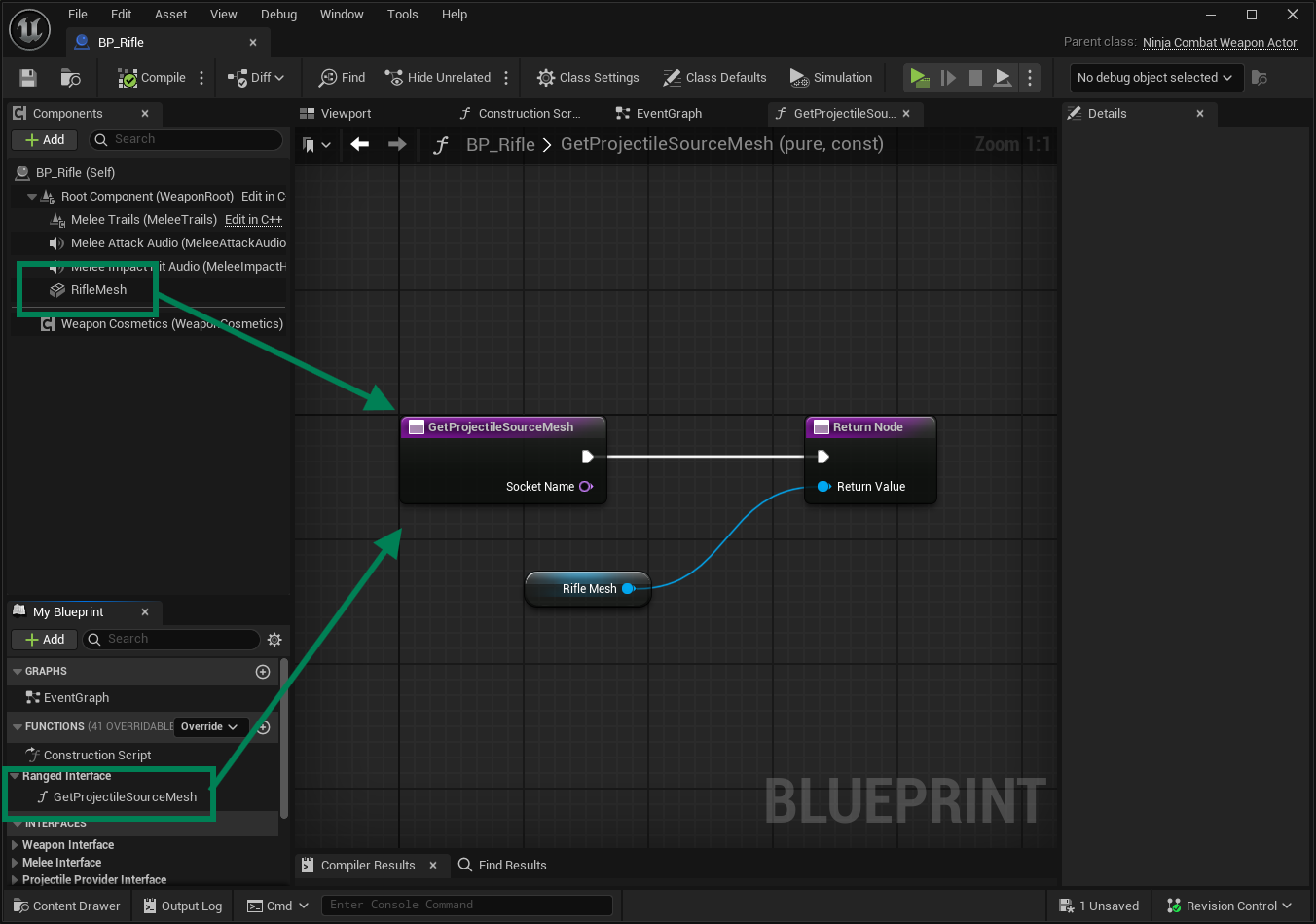
Make sure that your Ranged Weapon has a weapon tag, such as
Inventory.Item.Type.Rifle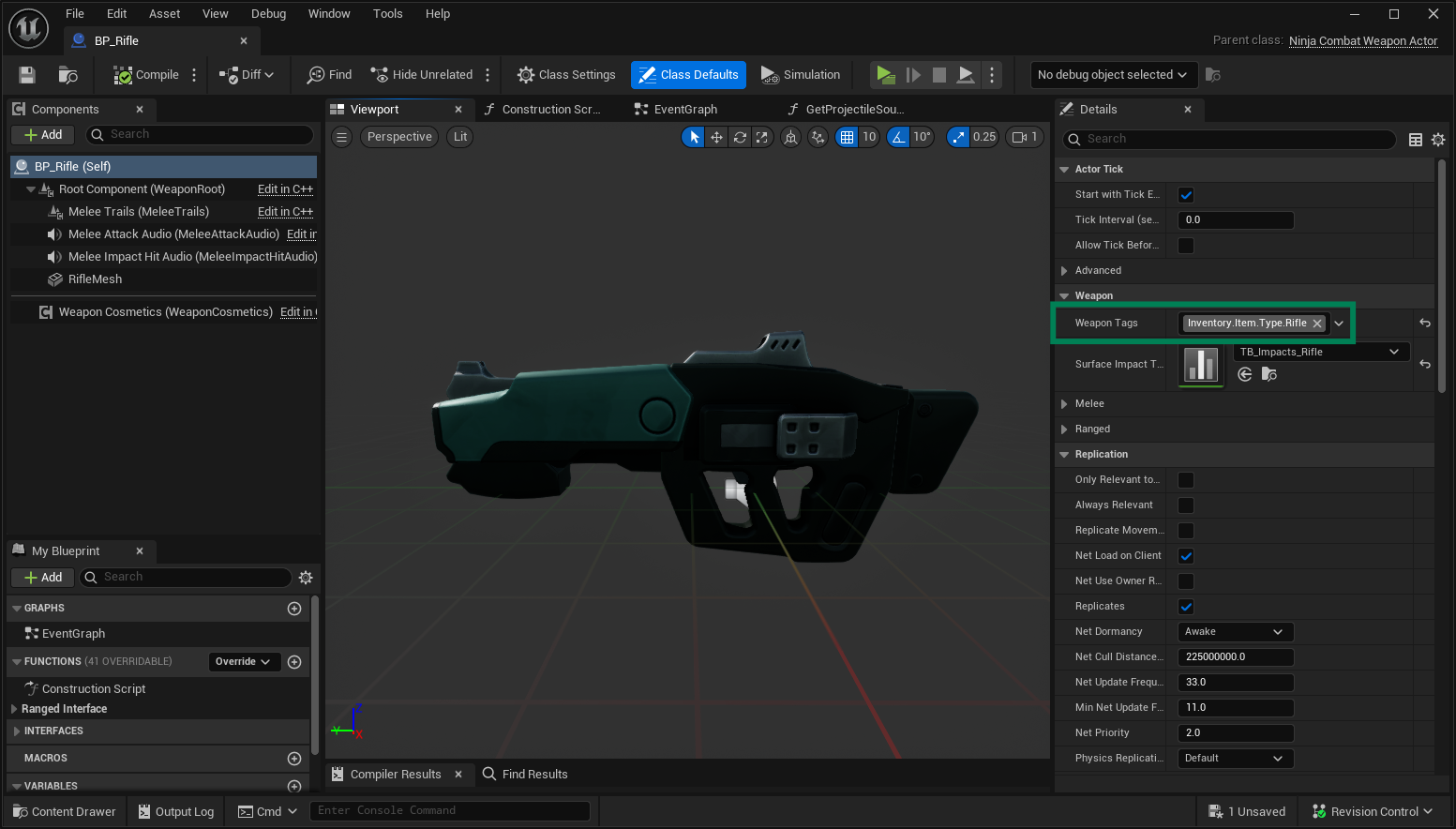
On top of the functions defined by the Projectile Interface, there are multiple functions marked as BlueprintNativeEvent, so they can be extended in Blueprint or C++. The table below lists some of the most relevant ones.
Function | Description |
|---|---|
| Launches the projectile forward, considering the Initial Rotation. |
| Launches towards the provided target actor. |
| Launches the projectile when no target was found by the targeting preset. |
| Launches towards the location, most likely set in |
| Defines the initial rotation, when the projectile is launched forward. |
Projectile Requests
Projectile Requests are used to launch projectiles during an attack. While animation triggers the launch event, the projectile is ultimately spawned by the Gameplay Ability.
Configuring a Projectile Launch
Create or open an Animation Montage that represents the ranged attack.
Find the frame where the launch should happen and add a Launch Projectile Animation Notify.
Configure the Animation Notify to launch the projectile from a weapon, retrieved dynamically from the Weapon Manager, using the weapon query to match with the desired weapon (e.g.
Inventory.Item.Type.Rifle).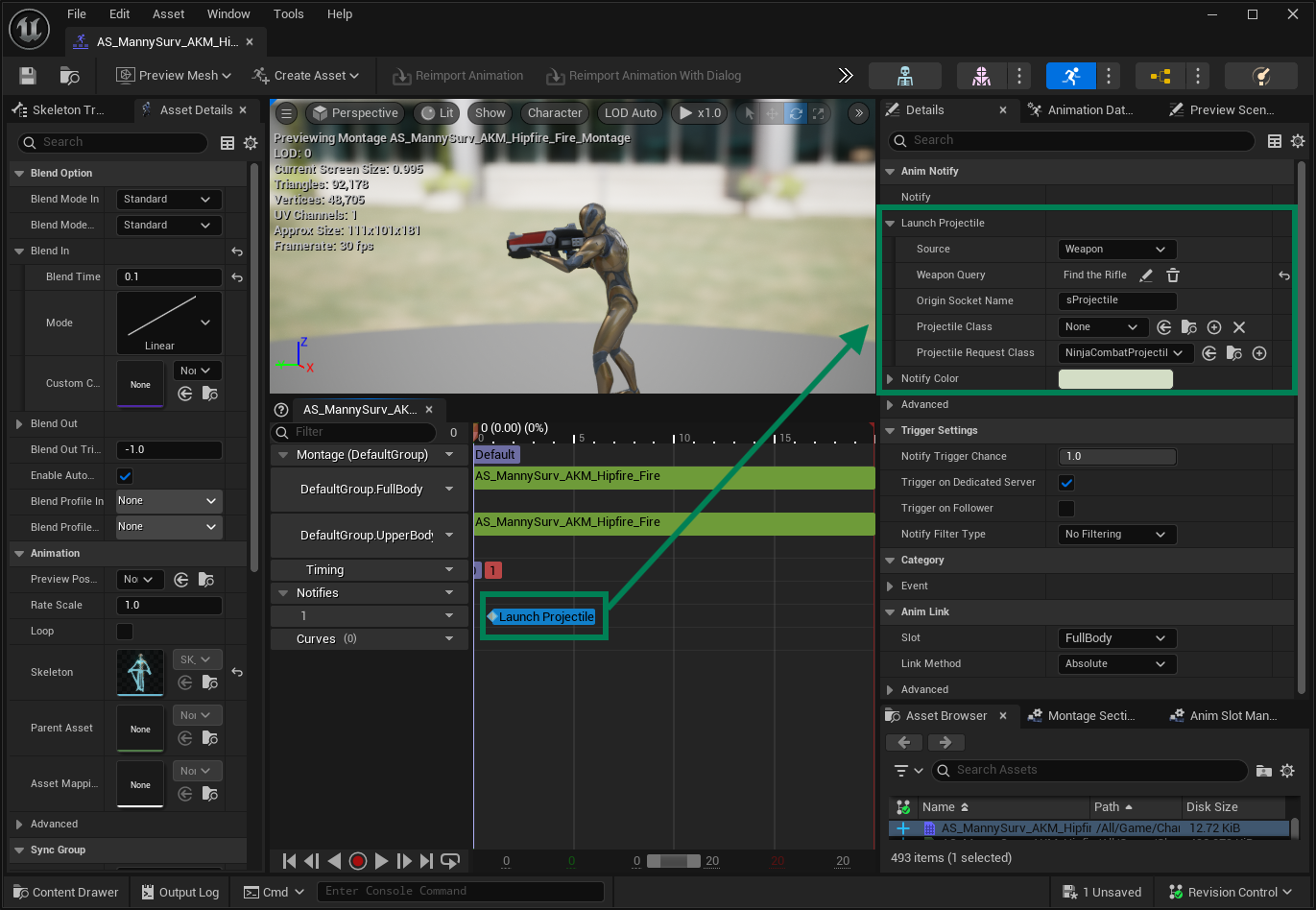
Projectile Request Class
This object is used to transfer launch data between all the framework layers: Animation, Ability, and Task. It contains the logic to spawn a projectile actor, including the option to retrieve it from the Actor Pool.
The Launch Projectile Anim Notify creates an instance of this class which will be used by the Attack Ability to ultimately spawn a projectile actor, when the gameplay event is received.
Projectile Launch and Hit Flow
We can summarize the projectile lifecycle with the following events:
The Ranged Attack Ability is triggered and plays the Animation Montage.
The Animation Montage plays the Launch Projectile Animation Notify.
The Animation Notify sends a Gameplay Event to the current Attack Ability.
The Attack Ability retrieves the Projectile Request from the event payload and spawns the projectile.
On hit, the projectile applies the Gameplay Effect on the target.
Attack Ability
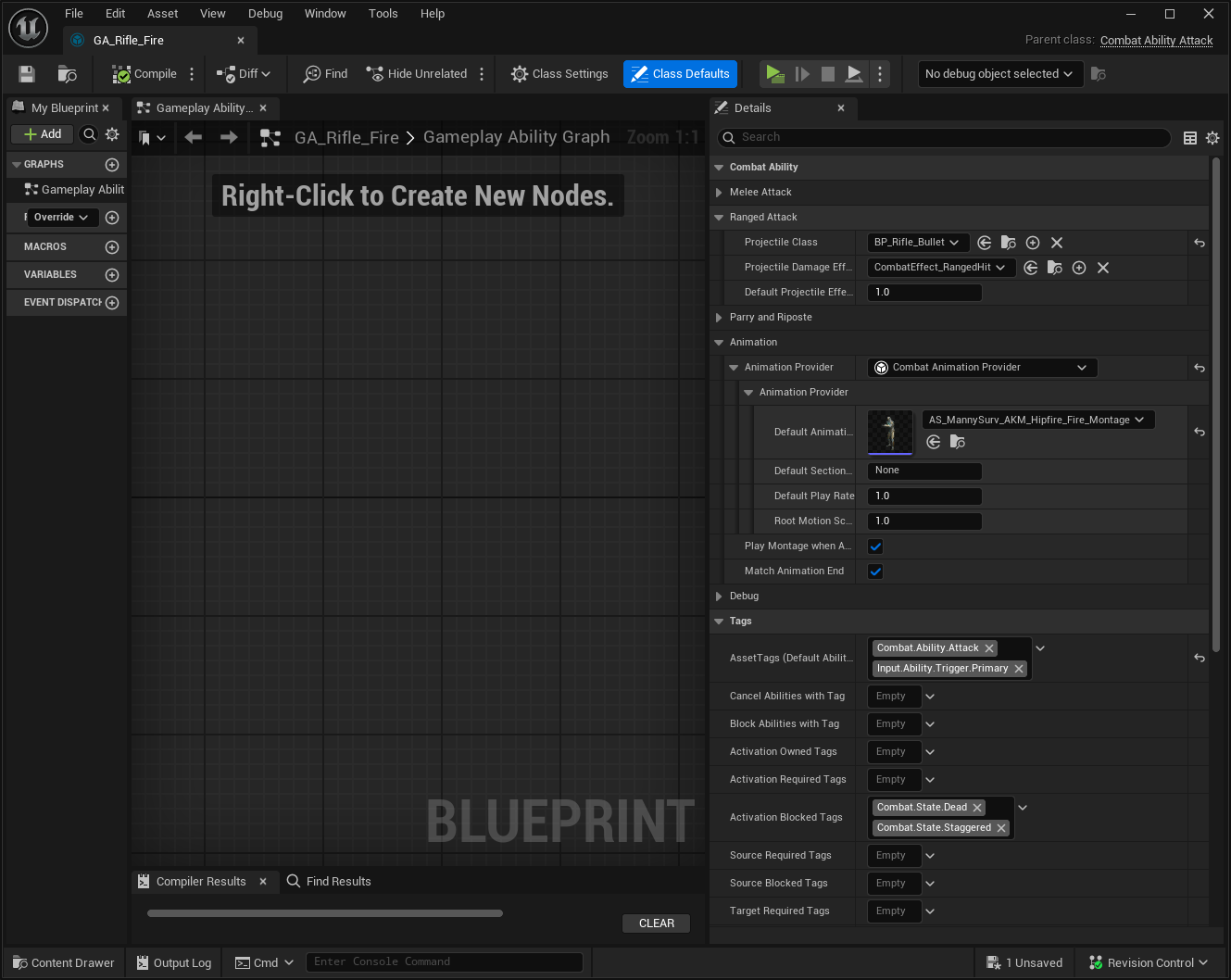
The Attack Ability is responsible for Melee and Ranged attacks. To get started with Ranged Attacks, all you need to do is setting the Default Animation Montage and make sure to assign this Gameplay Ability to your character.
Configuring the Ranged Attack
Create a Gameplay Ability based on
CombatAbility_Attack.In the Ranged Attack category, set the Projectile Class that will be used by this attack.
Configure the Animation Montage previously configured, with the Launch Projectile Animation Notify.
When you are done, your Ranged Attack should be similar to this.
Actor Pooling
Projectiles are a common candidate for Actor Pooling. This reduces the cost of spawning and garbage collecting projectile actors constantly used in the game.
Ninja Combat has an Actor Pool and the default Projectile Actor is also a Poolable Actor. The default spawn logic in the Attack Gameplay Ability will take that into consideration and will try to retrieve an actor from the pool, before spawning a new one in the world.
Check the Actor Pool page for more information about enabling the Actor Pool and registering the projectile actor to it.