Parry and Riposte
A parry is a defensive mechanic where a well-timed counter can interrupt an enemy's attack and place them in a vulnerable state. This vulnerability often creates an opportunity for a powerful follow-up, such as a riposte that deals additional damage or triggers a special animation.
These concepts have been made widely popular by soulslike games, where precision, patience, and mastery of timing are rewarded with satisfying and impactful responses.
While the terms "parry" and "riposte" are genre-inspired, the system is flexible. You can simply think of them as counters and follow-up attacks, making them suitable for a variety of combat styles and game types beyond just soulslike design.
Parry Window
A Parry Window defines the opportunity window for a target to successfully execute a parry. This window can be set in two ways: by using the Melee Scan Animation Notify State, or a dedicated Parry Window Animation Notify State.
Melee Scan Animation Notify State
Parry windows are often tied to a melee scan, since the opportunity to counter typically aligns with the moment an attack can apply damage.
Setting a Melee Scan as a Parry Window
Open an Animation Montage that already has a Melee Scan configured.
In the list of Melee Scan Tags, add
Combat.State.Parry.Victim. This marks the attacker as vulnerable to a Parry for the duration of the scan.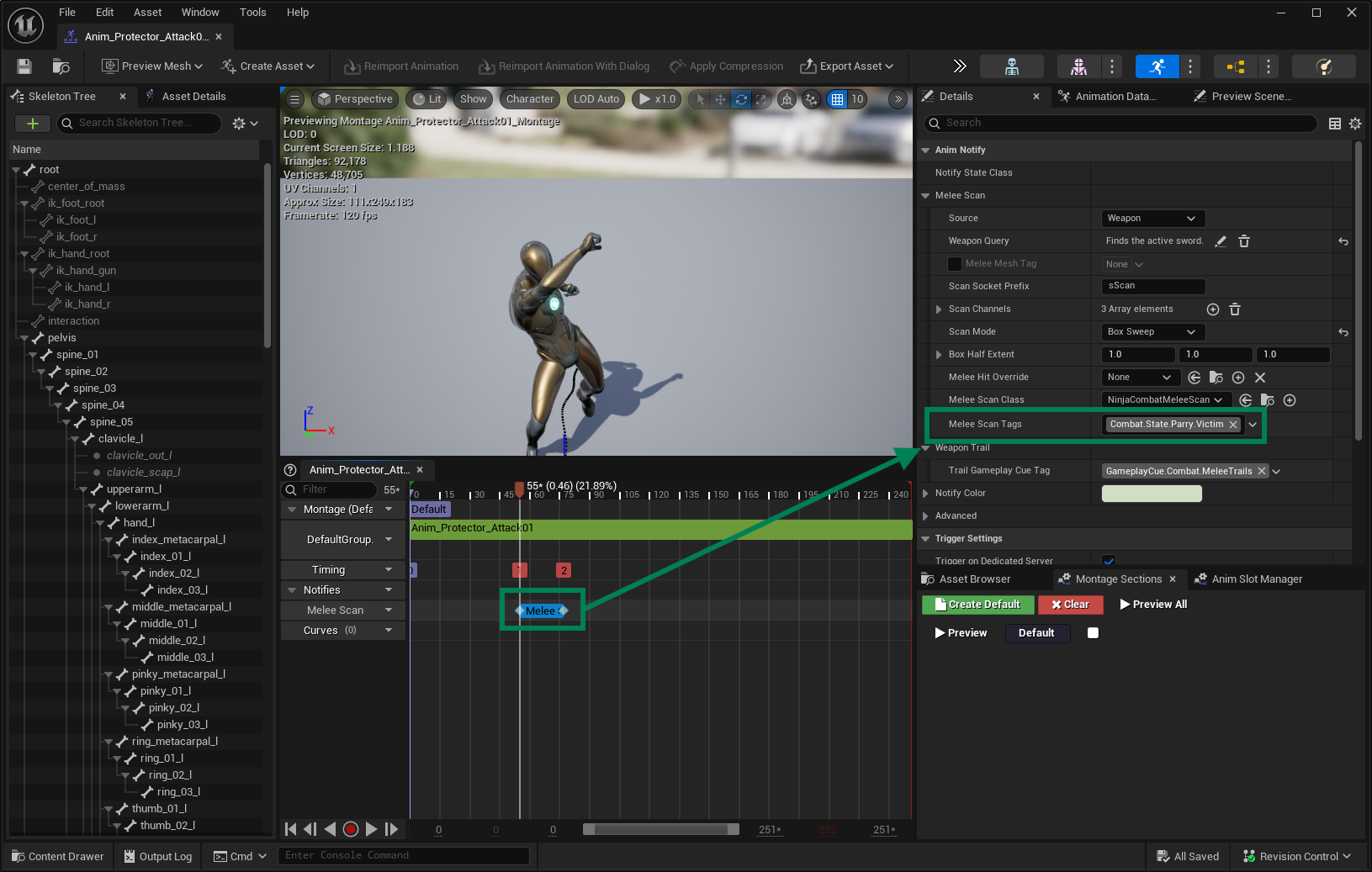
This approach is simple and works well in many cases, but it comes with two important caveats:
Since the Parry Window overlaps with the damage frames, players must be extremely precise. A mistimed but technically successful parry may still result in taking full damage.
You cannot display a dedicated Gameplay Cue for the Parry Window unless it shares the same cue as the Melee Scan.
If precision and feedback are important in your design, consider using a separate Parry Window Animation Notify State instead.
Parry Window Animation Notify State
Ninja Combat provides a dedicated Notify State for the Parry Window. You can place this Notify just before the Melee Scan, giving players a small lead-in window to successfully parry before the attack becomes dangerous.
This Notify State also supports a dedicated Gameplay Cue, which can be used to visually or audibly notify players of the parry opportunity.
Configuring the Parry Window
Open an Animation Montage that includes a Melee Scan.
Add the Parry Window Animation Notify State just before the scan. You may also assign a Gameplay Cue to signal the window to players.
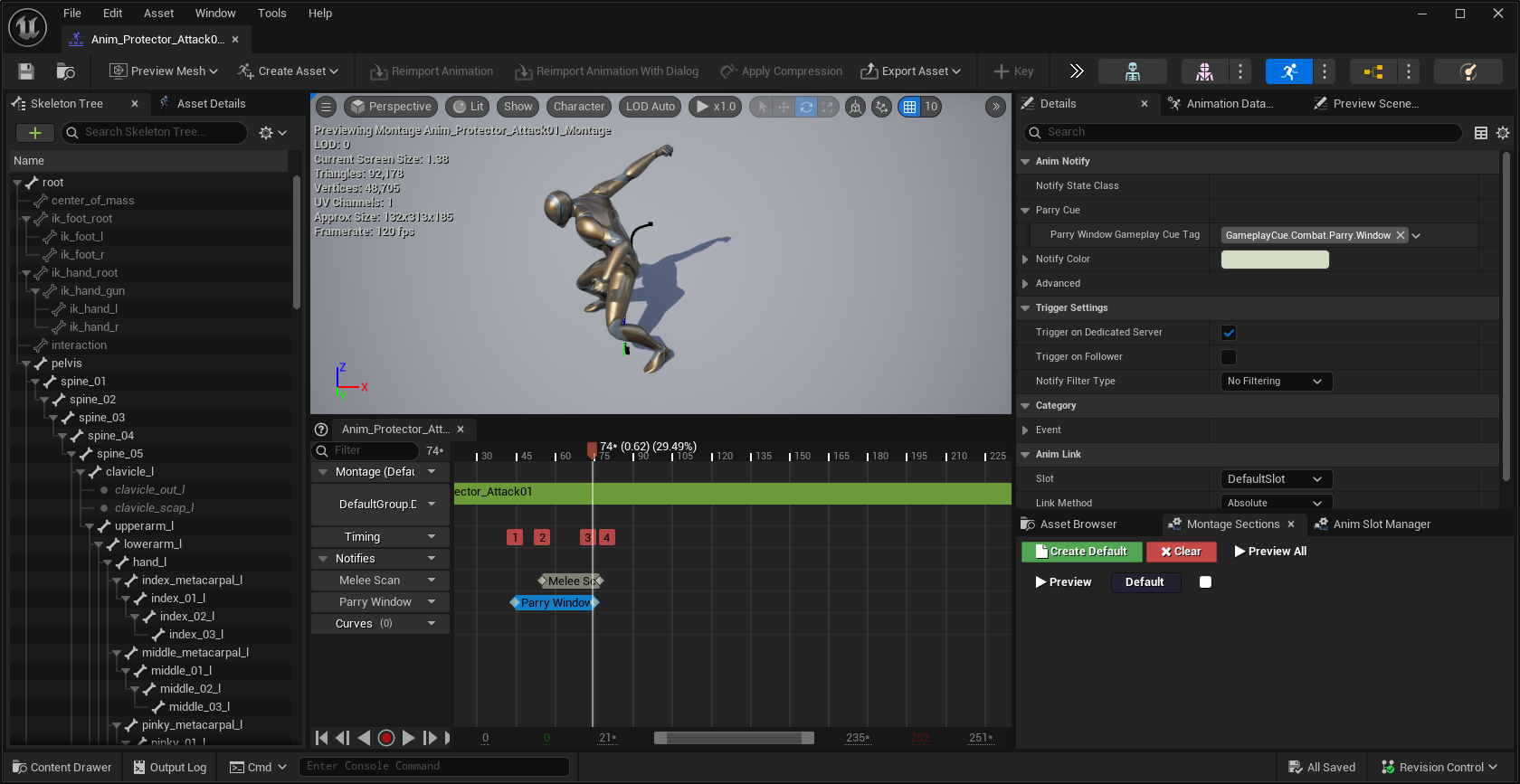
As long as your Attack Ability is already configured, this is all that's needed to make the attack vulnerable to parries.
Parry Window Gameplay Cue
The Parry Window Animation Notify State applies a Gameplay Cue to the owner, which can trigger cosmetics that communicate the active Parry Window to players—such as particles, sounds, or other visual effects.
Ninja Combat provides a base Static Gameplay Cue Notify that can be used to represent the Parry Window. To use it, your Combat Mesh should have appropriate sockets where the cue’s visual elements will attach.
Registering the Parry Window Cue
Open your character’s Mesh and create a socket named
sParryNotifywhere the cue should appear.Create a new Blueprint or C++ class based on
GameplayCueNotify_ParryWindow.Add any desired particles and sounds to the notify.
You can also support multiple types of cues on the same character, such as one for a Left Hand attack and another for a Right Hand attack. To handle scenarios like this, create the corresponding sockets and set distinct Gameplay Cue Tags.
Handling Multiple Parry Cues
Create all necessary sockets on your character’s Mesh to anchor each unique Parry Window Cue.
In the Animation Montage, open the Parry Window Notify State and set a Gameplay Tag that reflects the specific window, such as
GameplayCue.Combat.Parry.Window.RHfor a right-hand attack.Create a new Parry Window Cue (as before), setting the correct socket and Gameplay Cue Tag to match the notify state.
Parry Scans
With the Parry Window configured on the attacker, it’s time to handle the defender's side who will be executing a Parry Counter. This is done using a Parry Scan, which works similarly to a Melee Scan.
A Parry Scan searches for a viable Parry target, typically the attacker currently in a Parry Window, and triggers the counter effect when the scan is successful. These scans are configured in the Parry Counter animation montage, usually played during a successful parry response.
Configuring Parry Scans
Open the Animation Montage that represents the Parry Counter ability (the animation played by the defender after a successful parry).
Add the Parry Scan Animation Notify State to the frames that should trigger the scan.
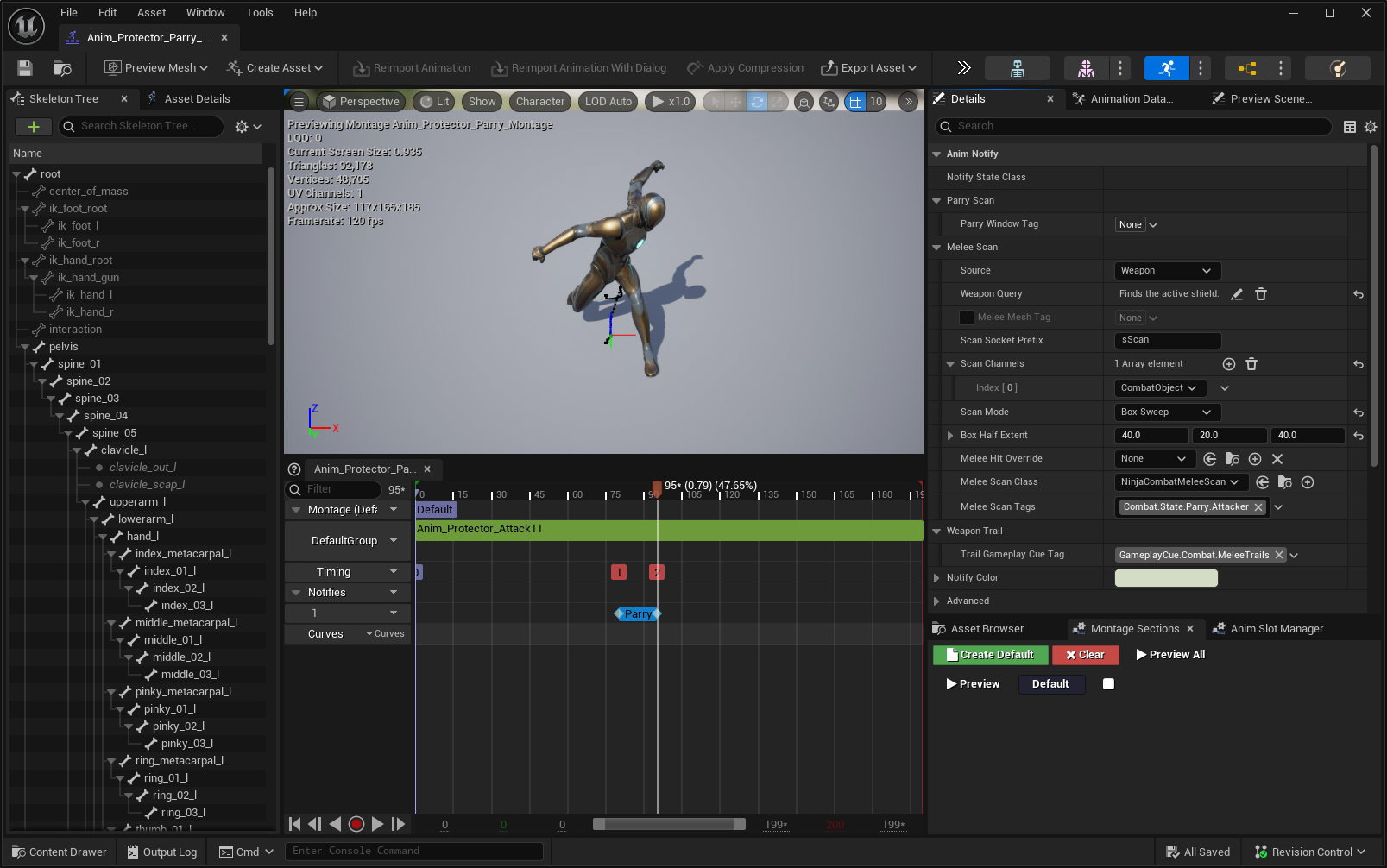
In the Configuration Panel, set the Weapon Query to find the correct defensive item, usually the shield equipped by the character.
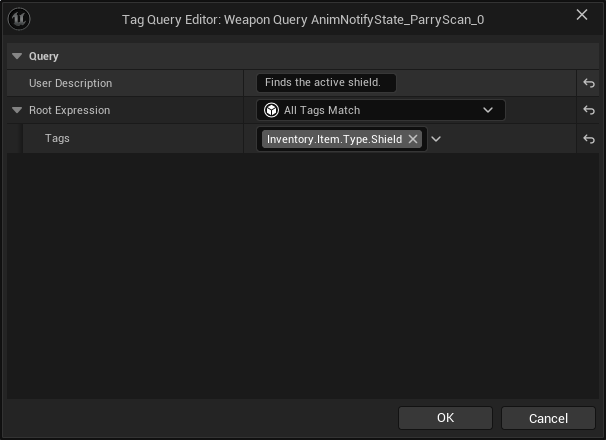
Set the Scan Channel to
CombatObject, ensuring it detects combatants that can be parried.Choose an appropriate collision shape (such as a box or capsule) that accurately represents the parry area—this is often the shield or arm sweep zone.
Once configured, this scan will actively look for a target with an active Parry Window during the scan’s active frames, allowing the counter to be performed if a valid target is found.
Parry Ability
With the Parry Scan configured, the next step is to create the Parry Ability, which is similar to a standard Melee Attack but includes additional options specific to parry behavior.
Property | Description |
|---|---|
Successful Parry Effect Class | The Gameplay Effect applied to the avatar when a parry is successfully executed. This can include buffs or status effects. |
Successful Parry Effect Level | The level at which the successful parry effect is applied. |
Remove Riposte Effect | If set to true, this will remove any Riposte Chance effect. You typically don't want to set this in a Parry Ability, but it may be useful in attacks that consume the Riposte state. |
Creating a Parry Ability
Create a new Gameplay Ability based on
CombatAbility_Parry.Assign the Animation Montage that includes the Parry Scan Notify State.
Grant this ability to your character and assign it to the appropriate input action.
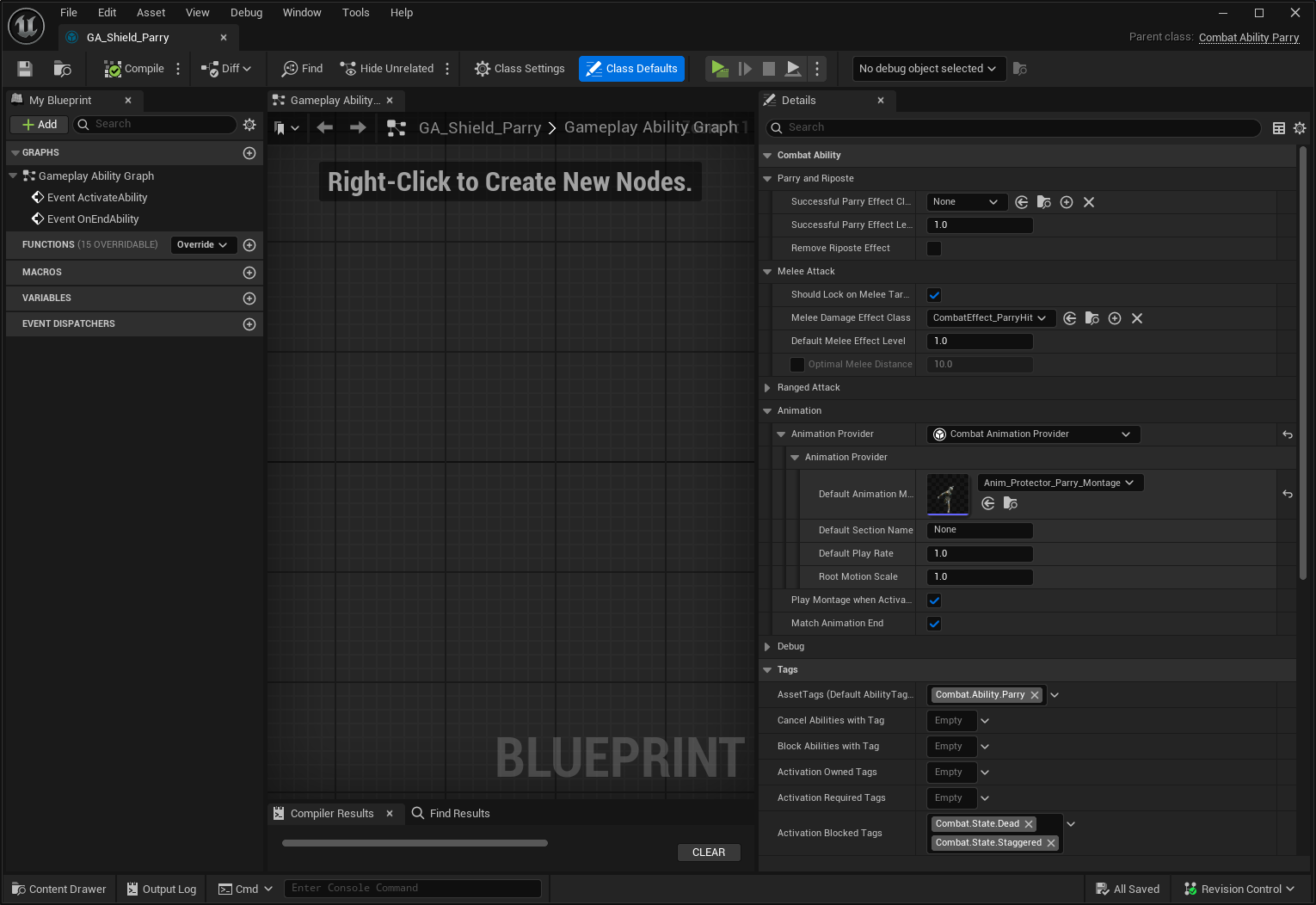
At this point, you have a complete implementation of a Parry System, where an enemy can expose a Parry Window, and the player can respond with a Parry Ability that detects and reacts to it.
Next, let’s look at the Riposte, the powerful counterattack that usually follows a successful parry.
Riposte Opportunity
Once a successful parry is detected, the Combat Manager applies a Riposte Opportunity to its owner. This signals a limited window during which a Riposte Attack can be executed.
By default, the Riposte Opportunity is represented by the CombatEffect_RiposteOpportunity Gameplay Effect. This effect is configured in the Combat Manager, and its duration is defined by the RiposteWindowDuration Gameplay Attribute, which you can tune to fit your game’s timing and difficulty.
The opportunity ends either when the duration expires or when an ability consumes it, such as the dedicated Riposte Ability.
Riposte Ability
Finally, let's discuss the Riposte Ability, which is also a special type of attack with a few additional options:
Property | Description |
|---|---|
Successful Riposte Effect Class | Gameplay Effect applied to the avatar on a successful riposte. |
Successful Riposte Effect Level | Level for the Gameplay Effect applied. |
Remove Riposte Effect | If true, removes a Riposte Chance. This is usually set in Riposte attacks. |
Creating the Riposte Ability
Prepare an Animation Montage for your attack. There are no special requirements for this montage.
Create a Gameplay Ability based on
CombatAbility_Riposte.Set the Animation Montage you created in the ability.
Add the ability to the character and configure the necessary input mapping.
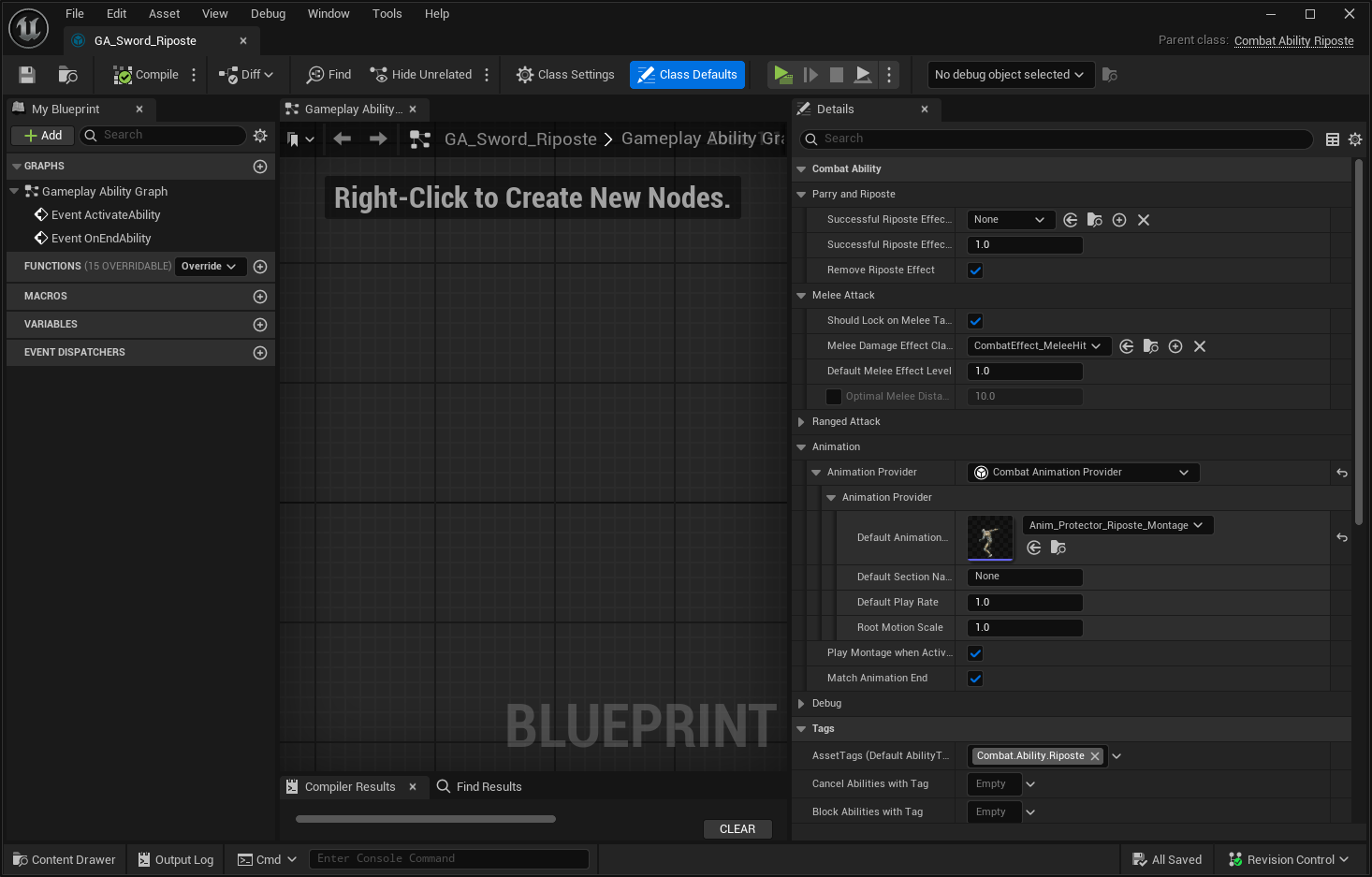
This finishes a basic setup for Parry and Riposte. At this point, the full system should now be functional in your project.