Combat Components
Ninja Combat uses a set of core components to connect Characters, Pawns, abilities, animation, targeting, damage, defense, and weapons.
At the center of this setup is the Combat Manager Component, which acts as the main access point for combat-related systems. Supporting systems are exposed through interfaces, so projects can use the default components, replace specific parts, or extend the framework with custom implementations.
This page explains the main combat components, how they work together, and how projects can customize specific parts of the combat setup.
Combatant Setup
A combatant is usually a Pawn or Character that has a Combat Manager Component and implements the Combat System Interface.
The Combat Manager should be added to the Pawn or Character that represents the combatant, regardless of where the related Ability System Component is located. For example, the Ability System Component may still live on the Pawn, Player State, or another appropriate owner for your project.
Combat System Interface
The Combat System Interface defines the main references used by Ninja Combat to interact with a Pawn or Character.
Most projects should implement this interface directly on their base character or pawn class. Doing so makes the combat setup explicit and avoids relying on fallback lookups.
Function | Description |
|---|---|
| Provides the Combat Manager Component used by the combatant. |
| Provides the Skeletal Mesh Component used as the combat mesh. This is usually the visible character mesh. |
| Provides the Animation Instance used for combat animation logic. This is usually the animation instance from the combat mesh. |
| Provides the Forward Reference used by combat systems that need a stable forward direction, such as targeting, aiming, motion warping, or projectile/cast setup. |
Combat Manager Component
The Combat Manager Component is the main component in the system. Every Pawn or Character considered a combatant should have one.
The Combat Manager does not have its own replacement interface because it is the anchor used by Ninja Combat to access combat-related functionality. You can still subclass it when you need deeper customization.
The Combat Manager is responsible for:
Providing the main combat entry point for the owner.
Resolving supporting combat components during setup.
Caching supporting components for later use.
Providing default implementations for some combat interfaces.
Exposing common combat delegates.
Coordinating combat-related systems such as targeting, damage, defense, parry, motion warping, and weapons.
During initialization, the Combat Manager resolves the supporting combat components available on the owner and stores them for later use. After that point, combat systems access the cached components instead of repeatedly searching the actor.
This allows projects to keep a simple setup using the default components, while still replacing specific parts when needed.
Supporting Combat Components
Ninja Combat separates combat functionality into smaller interface-based roles. Some roles are implemented by the Combat Manager itself, while others are handled by supporting components.
Role | Purpose |
|---|---|
Ammo Storage | Stores and provides ammunition data for abilities and weapons that consume ammo. |
Combo Manager | Tracks combo state and coordinates combo progression. |
Damage Manager | Handles damage-related state, damage events, death, stagger, knockdown, and similar damage outcomes. |
Defense Manager | Handles defensive states such as blocking and invulnerability. |
Dissolve Manager | Handles dissolve-related presentation when the combatant dies or is removed. |
Motion Warping | Provides motion warping support for abilities and animation-driven movement. |
Movement Manager | Provides movement-related state and behavior, usually through the Character Movement Component. |
Parry Manager | Tracks parry windows and parry-related combat state. |
Physical Animation | Provides physical animation support for reactions and impact presentation. |
Target Manager | Tracks combat targets and target changes. |
Weapon Manager | Provides weapon-related data and access to equipped weapons or weapon actors. |
The exact component setup can vary by project. For example, a simple enemy may use only the Combat Manager and default components, while a player character may use custom weapon, targeting, ammo, or motion warping components.
Default and Optional Components
Some supporting roles can be provided by the Combat Manager itself. Others may be provided by separate components.
When a supporting component is optional, Ninja Combat can use a default component, a custom component already present on the owner, or no component at all depending on the feature and project setup.
This keeps simple characters lightweight while allowing advanced characters to provide their own specialized components.
Examples:
A character that does not use weapons may not need a Weapon Manager.
A character that does not use motion warping may not need a Motion Warping component.
A character that uses a custom targeting system can provide its own Target Manager implementation.
A character that uses project-specific equipment can provide a custom Weapon Manager implementation.
Combat Delegates
The Combat Manager and supporting interfaces expose delegates that can be used by gameplay systems, UI, animation, and custom features.
Delegate | Source | Purpose |
|---|---|---|
| Combat Manager | Informs that an attack is starting. Provides the Ability Tags and the locked target, if any. |
| Target Manager | Notifies when a new target is obtained or a target is lost. |
| Damage Manager | Notifies changes in the Staggered state. |
| Damage Manager | Notifies incoming damage. |
| Damage Manager | Notifies the death of a combatant. |
| Defense Manager | Notifies changes in the Blocking state. |
| Defense Manager | Notifies changes in the Invulnerability state. |
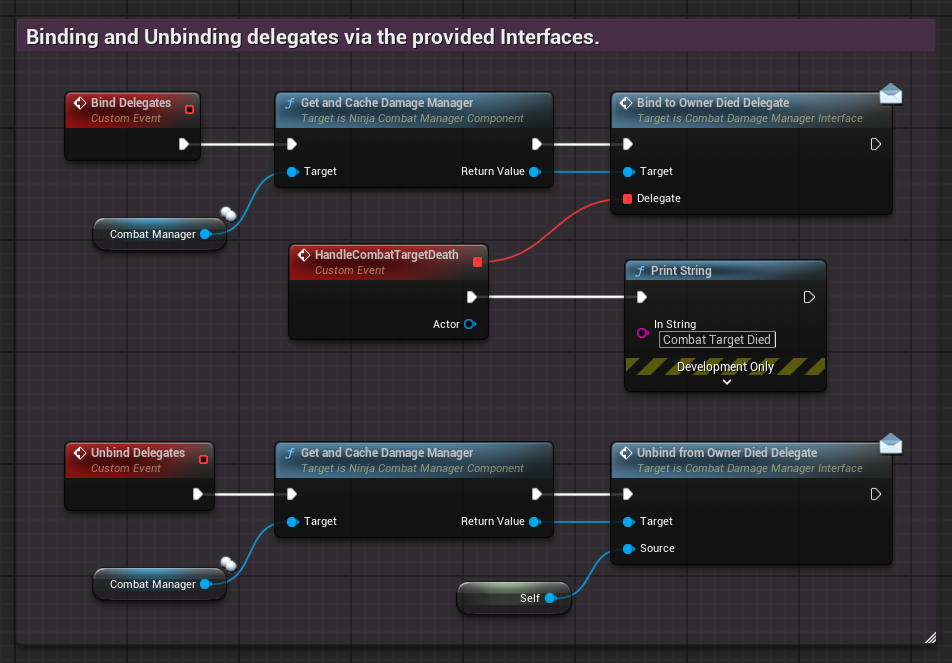
Delegate Binding
Except for delegates exposed directly by the Combat Manager itself, you should use the appropriate interfaces to bind to other delegates. You can unbind from them using the same interface.
Custom Combat Components
Custom components can be created by implementing the correct interface or extending one of the base classes provided by the Combat framework.
You can customize combat components in three common ways:
Add a custom component that implements the expected interface.
Subclass one of the default components and replace it on your character.
Subclass the Combat Manager when you need to customize how supporting components are provided.
Implementing an Interface
You can create a new Actor Component, implement the desired combat interface, and add it to your character.
During setup, the Combat Manager can resolve and cache components that implement the expected interfaces. This allows your custom component to replace a default implementation without changing the rest of the combat system.
Subclassing Components
You can subclass default components when you want to keep their existing behavior and extend only part of their functionality.
This is useful for components such as Motion Warping, Physical Animation, Weapon Management, or any project-specific component that needs to build on the default behavior.
Subclassing the Combat Manager
For deeper customization, you can subclass the Combat Manager itself.
This is useful when a project needs to change how optional supporting components are created, selected, or connected to the combatant.
Combat Movement Component
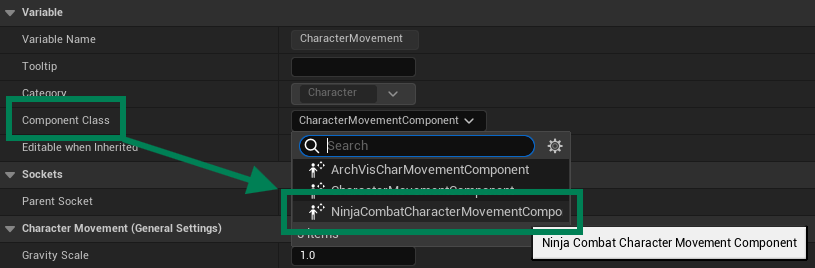
Ninja Combat includes the NinjaCombatCharacterMovementComponent class, a version of the Character Movement Component that can handle different movement speeds due to changes in blocking and strafing states.
You can replace the default Character Movement Component with the Combat version in Blueprint or C++.
Animation Instance
Ninja Combat includes the NinjaCombatAnimInstance class, a version of the Animation Instance that can serve as the base class for an Animation Blueprint.
This is optional, but useful when your Animation Blueprint needs direct access to common combat animation state, such as blocking, strafing, stagger, knockdown, or other combat-driven animation states.