Combo Orchestration
A combo is a sequence of Gameplay Abilities that are activated in a controlled order. In most cases, these are attack abilities, but a combo can use any Gameplay Ability, including melee attacks, ranged attacks, cast abilities, or custom abilities.
Combo orchestration is the way Ninja Combat coordinates these abilities through a Combo Manager, a Combo Ability, a Combo Tree, animation-based combo windows, and follow-up events from player input or AI logic.
The system is designed around Unreal Engine features instead of custom combo editors. Combos are authored as State Trees, which makes them visual, modular, and flexible enough to support simple attack chains, branching paths, conditional attacks, and AI-driven decisions.
Common Combo Patterns
The same orchestration model can support many different combo styles. These examples are useful to keep in mind before looking at the individual parts of the system.
Pattern | Description |
|---|---|
Linear Combo | A simple sequence where each input advances to the next attack. |
Branching Combo | A sequence where different inputs lead to different follow-ups. |
Heavy Finisher | A branch where a secondary input ends the combo with a stronger attack. |
Looping Combo | A sequence where the final state can return to the first state. |
Multiple Starting Points | A combo that can begin from different neutral states or opening attacks. |
AI-Driven Combo | A combo where Behavior Trees or State Trees choose the next event. |
Combo Manager
The Combo Manager is the component responsible for running combo logic for an actor.
In the default implementation, this is handled by NinjaCombatComboManagerComponent, which uses a State Tree Component to execute the active Combo Tree. Characters expose their Combo Manager through the Combat System Interface, allowing abilities, input handlers, AI tasks, and other systems to interact with combo state in a consistent way.
The Combo Manager is responsible for:
Running the active Combo Tree.
Tracking the current combo state and count.
Receiving combo events and forwarding them to the Combo Tree.
Broadcasting when a combo window opens or closes.
Combo Ability
The Combo Ability is the ability that starts the combo sequence and coordinates its execution.
When activated, it starts the configured Combo Tree and lets that tree decide which supporting abilities should activate. Those supporting abilities are usually attacks, but they can be any Gameplay Ability.
The Combo Ability can also grant and remove the supporting abilities required by the combo, so the character does not need to permanently own every ability used by every combo.
A Combo Ability usually defines:
Property | Purpose |
|---|---|
Combo Tree | The State Tree asset that defines the combo sequence. |
Ability Classes | Supporting abilities required by the combo. |
Event Mode | How incoming combo events are interpreted. |
Event Mappings | Input Action to Gameplay Tag mappings, when using Input Action mode. |
Net Sync Time Limit | Time limit in seconds for the net sync used for client predictions. |
The Combo Ability receives two kinds of input:
The normal activation input that starts the combo.
Follow-up gameplay events that advance the combo while a combo window is open.
Combo Trees
A Combo Tree is a State Tree that defines the structure of a combo.
Each state usually represents one step in the combo, such as a light attack, heavy attack, finisher, launcher, or special follow-up. States activate abilities through Combo State Tree tasks, and transitions decide where the combo can go next.
A typical Combo Tree uses:
Element | Purpose |
|---|---|
Evaluator | Combo state is transferred from the component to the tree via a dedicated evaluator. |
States | Represent combo steps, which are usually attacks. |
Tasks | Activate the Gameplay Ability for the current combo step. |
Conditions | Control when a state can be entered. |
Transitions | Move from one combo step to another. Usually triggered from combo events. |
The most common condition is based on ComboState.ComboCount, which allows each attack to match a specific point in the sequence. For example, the first follow-up may require a combo count of 1, while the next attack requires 2.
Branching
Since combos are authored as State Trees, branching is a natural part of the system.
A linear combo may use the same event tag for every transition, such as a primary attack input that moves from one attack to the next. A branching combo can add other event tags that lead to different states.
Event | Possible Meaning |
|---|---|
| Continue the light attack chain. |
| Branch into a heavy attack or finisher. |
This allows a single combo to support multiple outcomes, such as light attack chains, heavy finishers, directional attacks, aerial follow-ups, weapon-specific branches, AI-selected attacks, and conditional transitions based on runtime state.
Branching is handled by adding multiple transitions from a state. Each transition can listen for a different event tag, require different conditions, or both.
Combo Windows
A combo window is the period during an animation where the next combo input is accepted.
Combo windows are usually defined with the Combo Window Animation Notify State on the montage used by the current ability. While that notify state is active, the Combo Manager reports that the combo window is open and can receive a follow-up event.
This creates a simple timing model:
Timing | Result |
|---|---|
Input before the combo starts | Activates the Combo Ability. |
Input while the combo window is closed | Usually ignored, unless some sort of Input Buffer is active. |
Input while the combo window is open | Sends an event to advance the Combo Tree. |
No input before the window closes | The current combo path ends or completes naturally. |
Interacting with Combos
Combos are advanced by events. Those events can come from player input, AI logic, or any other system that can communicate with the Combo Ability and Combo Manager.
The first input usually starts the combo, while later inputs advance the combo during a combo window.
Player Input
Player input can interact with combos in two stages: The first input usually activates the Combo Ability. Follow-up inputs usually advance the combo, but only while a combo window is open.
For each input action related to the combo, the input logic can check whether the combo window is currently open:
If the combo window is closed, the input activates the Combo Ability normally.
If the combo window is open, the input sends a gameplay event to advance the Combo Tree. If the Combo Ability is set to use Input Action, the Input Action should also be provided as one of the Optional Objects in the payload.
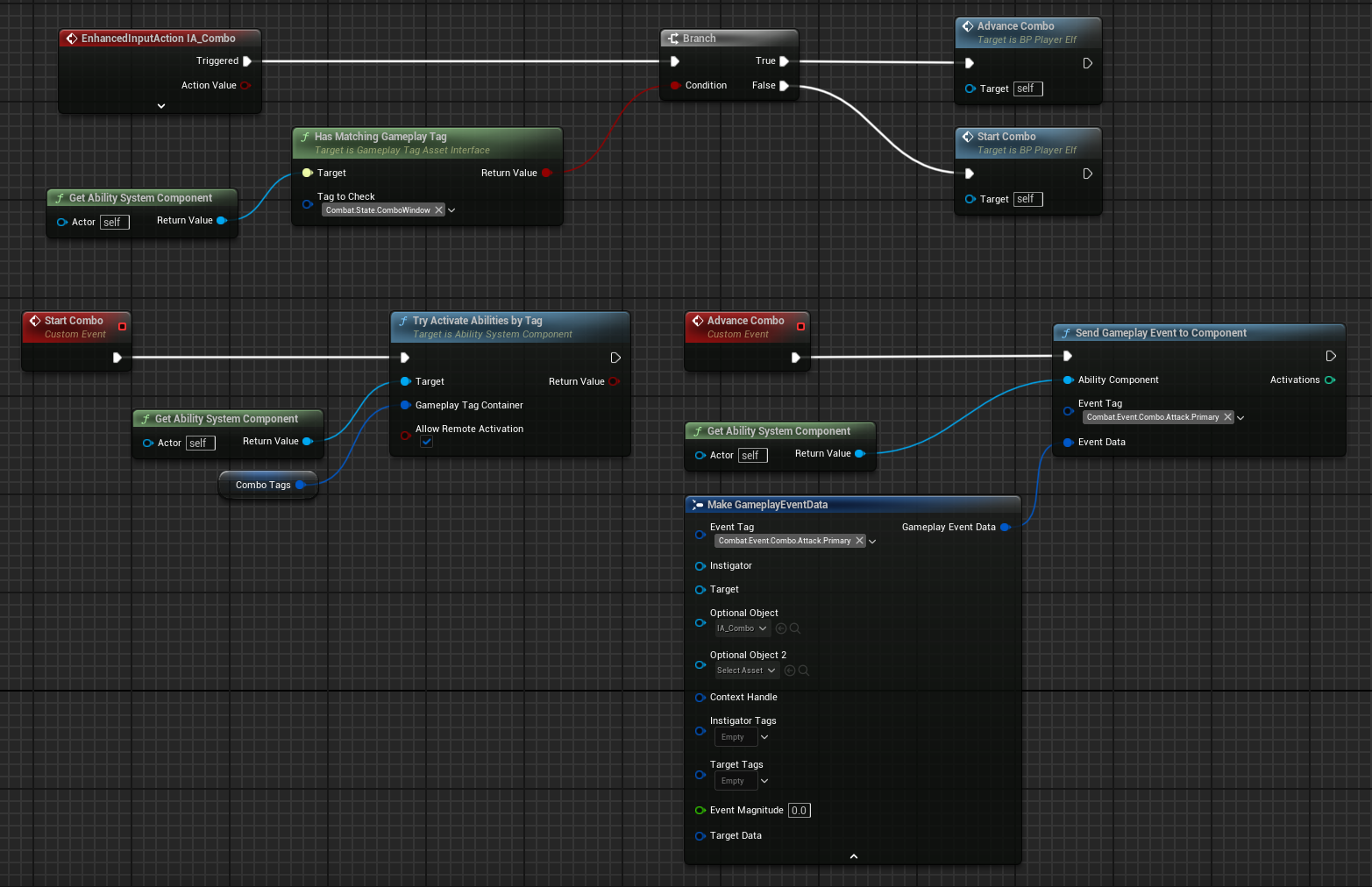
The event sent while the combo window is open depends on the Event Mode configured in the Combo Ability.
Event Mode | Input Behavior |
|---|---|
Gameplay Tag | Send the exact Gameplay Tag used by the Combo Tree transition, such as |
Input Action | Send |
This allows each input action to either start the combo or advance it, depending on the current combo window state.
Artificial Intelligence
AI agents can also use Combo Abilities.
Instead of reacting to button presses, AI logic listens for the Combo Manager to report that the combo window is open. When the window opens, the AI sends the next combo event, either as a Gameplay Tag or as an Input Action.
This can be done from Behavior Trees or State Trees.
AI System | Combo Support |
|---|---|
Behavior Tree | Uses the Advance Combo Service. |
State Tree | Uses the Advance Combo Task. |
By default, these can send input actions or event tags defined as properties. This supports both simple and advanced AI setups, depending on where the decision is made. Advanced combo decisions can be handled in two ways:
Add the same task or service to multiple AI branches, with each instance configured to send a specific event or payload. In this model, the Behavior Tree or State Tree decides which combo event should be sent.
Extend the task or service so it can decide which combo event should be sent at runtime. In this model, the task/service contains the decision logic.
To support runtime decisions, both the task and the service provide functions that can be extended to choose the Input Action or Gameplay Tag used to advance the combo.
Task Function | Description |
|---|---|
| Provides the Input Action added to the combo event payload. By default, uses the asset configured in the task/service. |
| Provides the Gameplay Tag used to identify the combo event. By default, uses the tag configured in the task/service. |