Behavior Tree Usage
This page walks you through the integration of the Token System with Behavior Trees.
This setup allows AI agents to request, track, and return tokens through dedicated tasks, decorators, and services - while a Blackboard asset stores key token data for coordination and debugging.
Blackboard
In addition to your usual AI-specific keys (like targets or states), the Blackboard should include the following Token-related keys, used internally by the Behavior Tree nodes to manage requests and state tracking.
Blackboard Key | Type | Description |
|---|---|---|
|
| Stores the unique Handle ID associated with a borrowed token. Used to identify and return specific tokens. |
|
| Stores the amount of budget granted to this token. |
|
| Tracks how many request attempts were made for this token. Helpful for retry logic or failure handling. |
|
| Stores the world time at which this token will expire, if the request was made with a defined expiration time. |
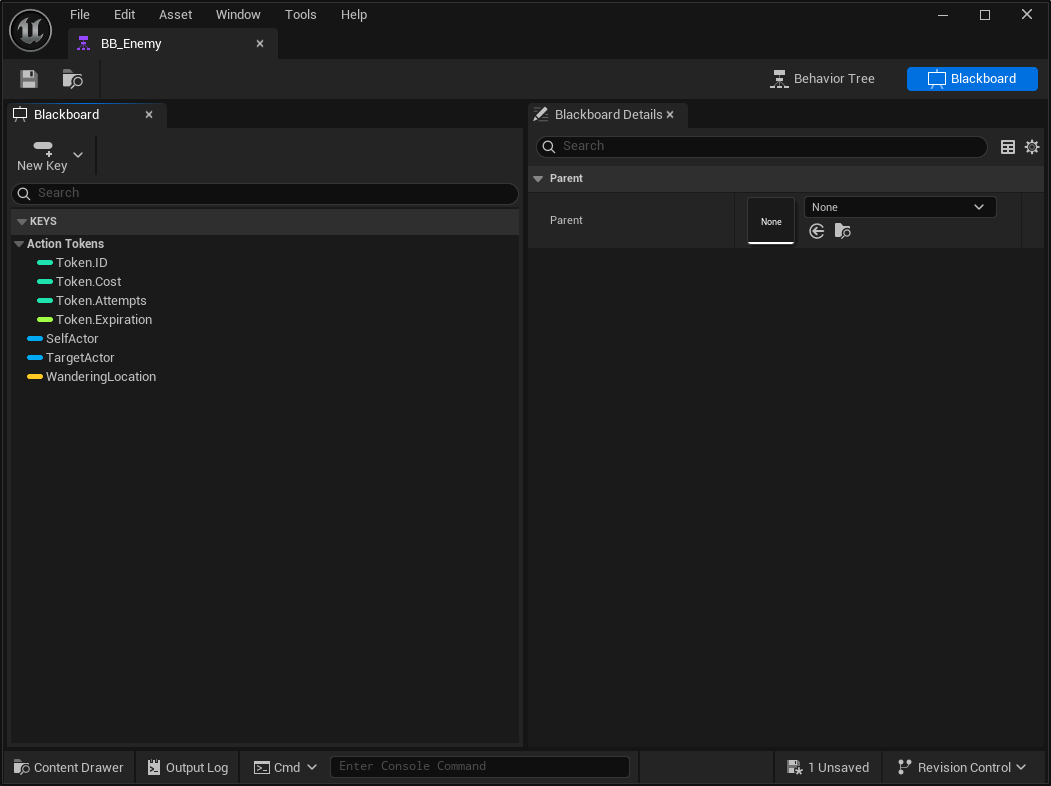
Behavior Tree
The Behavior Tree leverages dedicated nodes provided by the framework. These nodes handle the process of requesting, tracking, and returning tokens as part of AI decision-making, allowing smooth synchronization between multiple agents.
Request Token Service
The Request Token Service requests a token as soon as the service becomes relevant in the Behavior Tree. Once the token is granted - either immediately or after being queued—its details are automatically stored in the Blackboard for later use by other tasks or decorators.
Parameter | Description |
|---|---|
Token Tag | The Gameplay Tag that identifies the token type. Used to determine which token budget to request from the target. |
Cost | The amount to borrow from the target's token budget. Determines how much capacity this request will consume. |
Priority | The priority level of this request. Lower numbers indicate higher priority. This can be useful to ensure boss units or elite enemies acquire tokens before common AI. |
Queue Policy | Defines whether the token can remain in queue indefinitely or only for a limited time. |
Time To Live (Seconds) | Specifies how long the token can stay in queue before the request expires. Once expired, a denied event will be triggered. |
This service also uses blackboard keys as input and output.
Blackboard Key | In/Out | Description |
|---|---|---|
Target Actor | Input | The target actor that provides tokens (for example, a shared enemy target or coordination node). |
Token Handle ID | Output | The unique Handle ID assigned to the granted token. |
Token Handle Cost | Output | The budget amount granted to this token. |
Attempts | Output | The number of request attempts made to obtain this token. |
Token Expiration | Output | The world time when this token will expire, if applicable. |
Return Token Service
The Return Token Service automatically returns a token when the service ceases to be relevant. This ensures tokens are properly released when a branch is aborted or interrupted, typically due to a decorator condition forcing the Behavior Tree to transition to another path.
This service uses the Token Handle stored in the Blackboard to determine which token to return and automatically resolves the correct target provider. It serves as a safety fallback to the more explicit Return Token Task, ensuring cleanup even when tasks don't execute as expected.
Return Token Task
The Return Token Task explicitly returns a borrowed token during Behavior Tree execution. It uses the Token ID stored in the defined Blackboard entry to locate and release the corresponding token from the provider.
This task offers a manual alternative to the automatic cleanup performed by the Return Token Service, giving you direct control over when tokens are released, for example, after a successful attack or when an AI action completes.
Check Token Decorator
The Check Token Decorator verifies whether a token, defined by specific criteria, is currently available to the AI Agent.
This decorator is typically used to gate execution based on token availability—ensuring that an AI only proceeds with certain actions (like attacking or casting) when the necessary token can be obtained.
When evaluated, the decorator queries the associated Token Provider and determines if a matching token is available or granted. Depending on the configuration, the decorator can abort either the current branch, lower-priority branches, or both, allowing flexible control over AI flow when token availability changes.
Implementation Example
The following Behavior Tree demonstrates a simple but practical combat flow, integrating token-based coordination between AI agents.
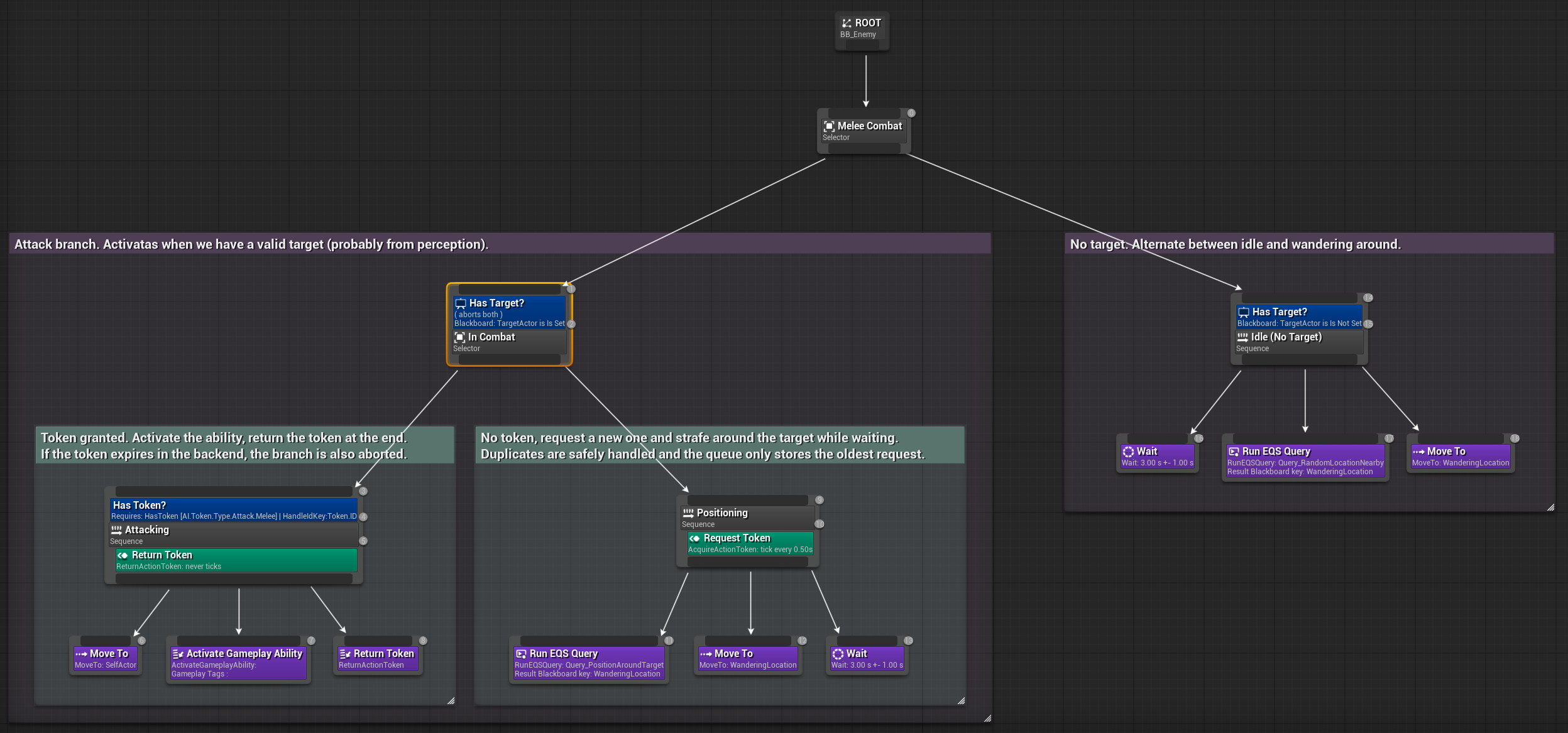
Check for a Valid Target: The AI first verifies if there's a valid target, usually obtained through perception. If a target exists, the combat branch is activated.
Check for a Valid Token: Within the combat branch, the AI checks if it already holds a valid Attack Token.
If a valid token is found: The agent proceeds with its attack behavior. If not, it will attempt to request one.
Once a token is granted: The AI performs the attack sequence: Moves toward the target; Activates a Gameplay Ability (e.g., a melee attack); Returns the token at the end of the sequence.
If the token expires in the backend: The branch is automatically aborted, ensuring safe cleanup.
If no token is available: The AI will request a new one and begin positioning behavior around the target: Runs an EQS query to find valid strafing positions; Moves around or waits while the request remains queued; Duplicate requests are safely handled, the queue only keeps the oldest pending request.
If no target is detected: The AI switches to an idle state, alternating between waiting and wandering around using random EQS-generated locations.