Gameplay Debugger
The Inventory Debugger is a category available in the Gameplay Debugger. You can check your debugger settings—and most importantly, the key used to open the debugger—under Project Settings → Engine → Gameplay Debugger.
While you're there, ensure that your Activation Key is properly set, along with your Category Keys. If multiple systems are contributing categories to the Gameplay Debugger, you may need to ensure the Inventory Category is properly listed under the Add-Ons section.
Once activated, the Inventory Debugger will appear in the Default View.
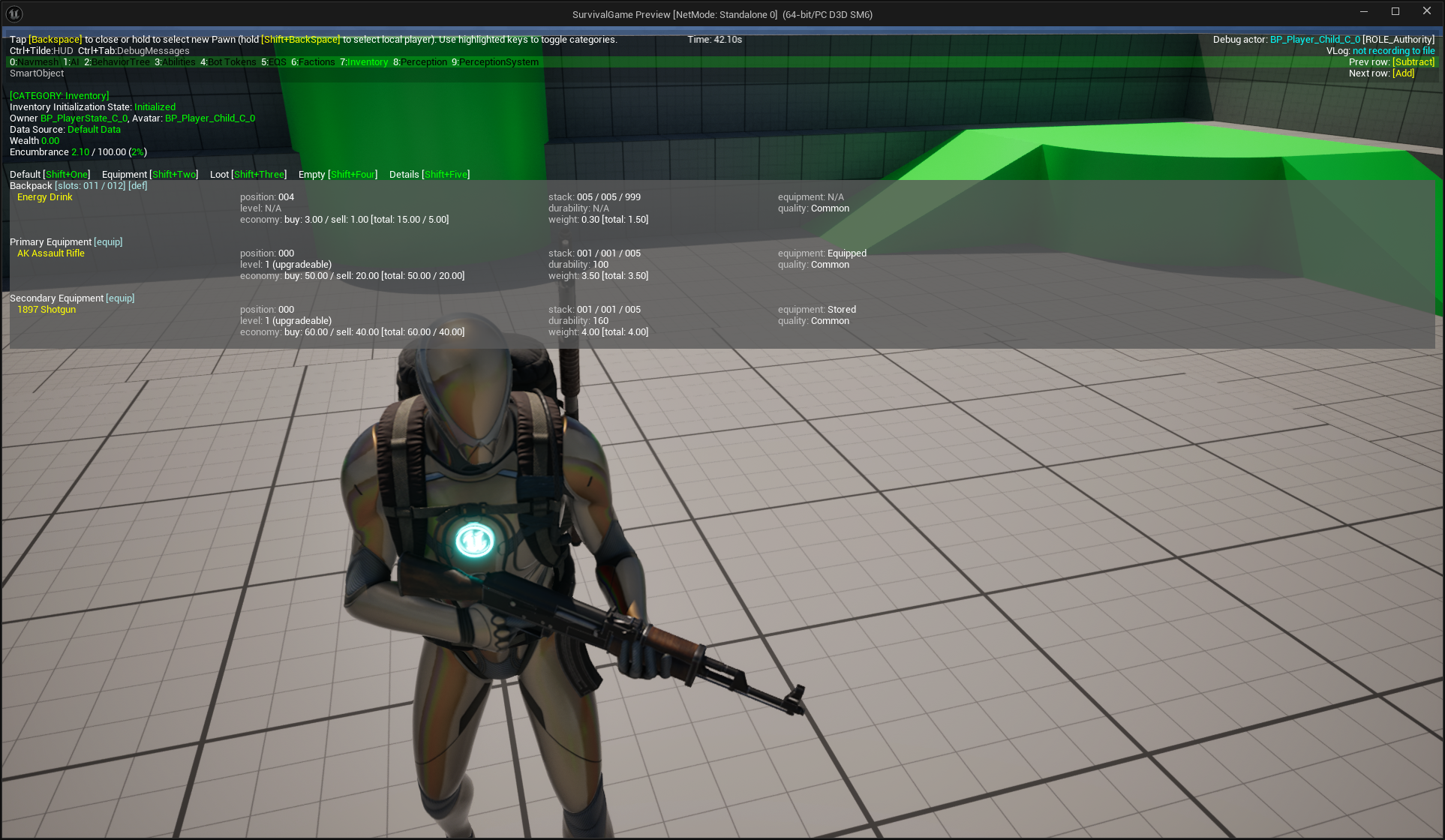
General Inventory State
The first section displays important information about the overall inventory state.
Inventory Property | Description |
|---|---|
Initialization State | Shows the current initialization state. Useful for debugging failures during the inventory startup process. |
Owner and Avatar | Displays the owner and avatar associated with the inventory. |
Data Source | Indicates whether the inventory was initialized using default items or loaded from a save game. |
Wealth | Current wealth value assigned to the owner, as defined by the relevant Gameplay Attribute. |
Encumbrance | Displays current item weight, max supported weight, and encumbrance, based on the appropriate Gameplay Attribute. |
Container and Item Breakdown
After the general state, the debugger shows all containers and their current items. For each item, the following
details are displayed:
Name
Position in the container
Stack Info (current amount, max stack size, storage limit)
Equipment State, if applicable
Additional notes:
Container titles indicate their type (Default, Equipment, or Loot) and their storage capacity.
You can toggle container visibility using the following shortcuts:
Shift+1– Show/Hide Default ContainersShift+2– Show/Hide Equipment ContainersShift+3– Show/Hide Loot ContainersShift+4– Show/Hide Empty Containers
Press
Shift+5to switch to the Detailed View, which displays extended item information from various fragments.