Gameplay Abilities
Ninja Inventory provides Gameplay Abilities that support common inventory actions such as equip, drop, and consume. These abilities are designed to accomplish the following tasks:
Select the items that will be modified by the ability.
Play an animation that represents the action being executed.
Apply changes to the item or equipment as a result of the action.
Ability Structure
All Ninja Inventory abilities derive from the shared base class: UNinjaInventoryAnimationAbility. This base introduces several key properties that configure the ability’s behavior:
Property | Description |
|---|---|
| Chooser Table used to determine the animation montage to play. Can be overridden via the provided interface. |
| The verb describing the animation action (e.g., equip, store, consume). Can be used to match animation events and responses. |
| Class used to build the Chooser Table criteria object. |
| If set to true, will still execute the underlying action when no montage is available. |
| Optional query used to locate an item if none is provided in the activation payload or as a context object. |
| Defines when the action should occur: at animation start, upon a Gameplay Event, or when the animation ends. |
| The Gameplay Event that will trigger the action, used only if the trigger policy is set to "Gameplay Event". |
Inventory abilities often require their actions to occur at a specific point during execution. To support varying project needs, Ninja Inventory introduces the concept of a Trigger Policy. Supported values include:
Animation Starts: The action is triggered as soon as the animation begins.
Gameplay Event: The action is triggered when a specific Gameplay Event, defined by the Event Tag, is received.
Animation Ends: The action is triggered once the animation has finished.
Item Selection
The base ability also handles item selection, determining which items will be modified by the ability's logic. Items are collected per ability execution and can be obtained in one of two ways:
Provided directly via an Activation Trigger Event payload, as optional context objects.
Queried from the inventory using the Item Query defined in the ability, when no payload items are provided.
When extending Inventory Abilities, you can respond to various lifecycle events by overriding the following Blueprint or C++ functions:
Function | Description |
|---|---|
| Handles the Gameplay Event used as a trigger. Executes item actions on payload items or all items gathered during activation. |
| Called when the ability animation starts. Executes the action if the trigger policy is set to "Animation Starts". |
| Called if the animation is canceled. Cancels the ability by default, but can be extended for fallback logic. |
| Called when the animation completes. Executes the action if the trigger policy is set to "Animation Ends". |
| Called when no items were collected after filtering. Cancels the ability by default. |
| Called when items were found, but no valid Animation Montage was selected by the Chooser Table. |
| Executes the core logic of the ability on a selected item. Override this function to define the actual item transformation. |
Chooser Table
All inventory-related abilities that play an Animation Montage use a Chooser Table to dynamically select the correct animation based on item traits and context.
Creating the Animation Chooser Table
Create a new asset from → Miscellaneous → Chooser Table.
Select Generic Chooser as the Chooser Type.
Set the Result Type to
Object of Typeand Result Class toAnimMontage.Add a new entry under Parameters, using
Class Parameteras the type.Set the Class to
NinjaInventoryAnimationCriteriaand Direction toInput.
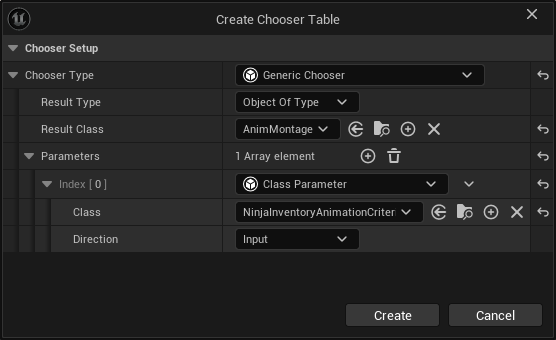
Chooser Source Interface
While Inventory Abilities support setting a default Chooser Table, some avatars may require dedicated tables (e.g., due to skeleton or animation differences).
To support this, avatars can implement the InventoryAnimationChooserSourceInterface.
By overriding GetInventoryAnimationChooser and returning a valid Chooser Table, this value will take precedence over the default set on the ability.
Animation Criteria
The Criteria Object, NinjaInventoryAnimationCriteria, is passed to the Chooser Table to determine which animation to play. It contains properties representing the Gameplay Ability, Item, and Action Context:
Property | Description |
|---|---|
| Tags assigned to the ability requesting the animation. |
| Tags representing the contextual action (e.g., equip, consume). |
| All gameplay tags from the item targeted by the action. |
Chooser Tables evaluate this data using Tag Matchers or Gameplay Tag Queries to select the correct AnimMontage.
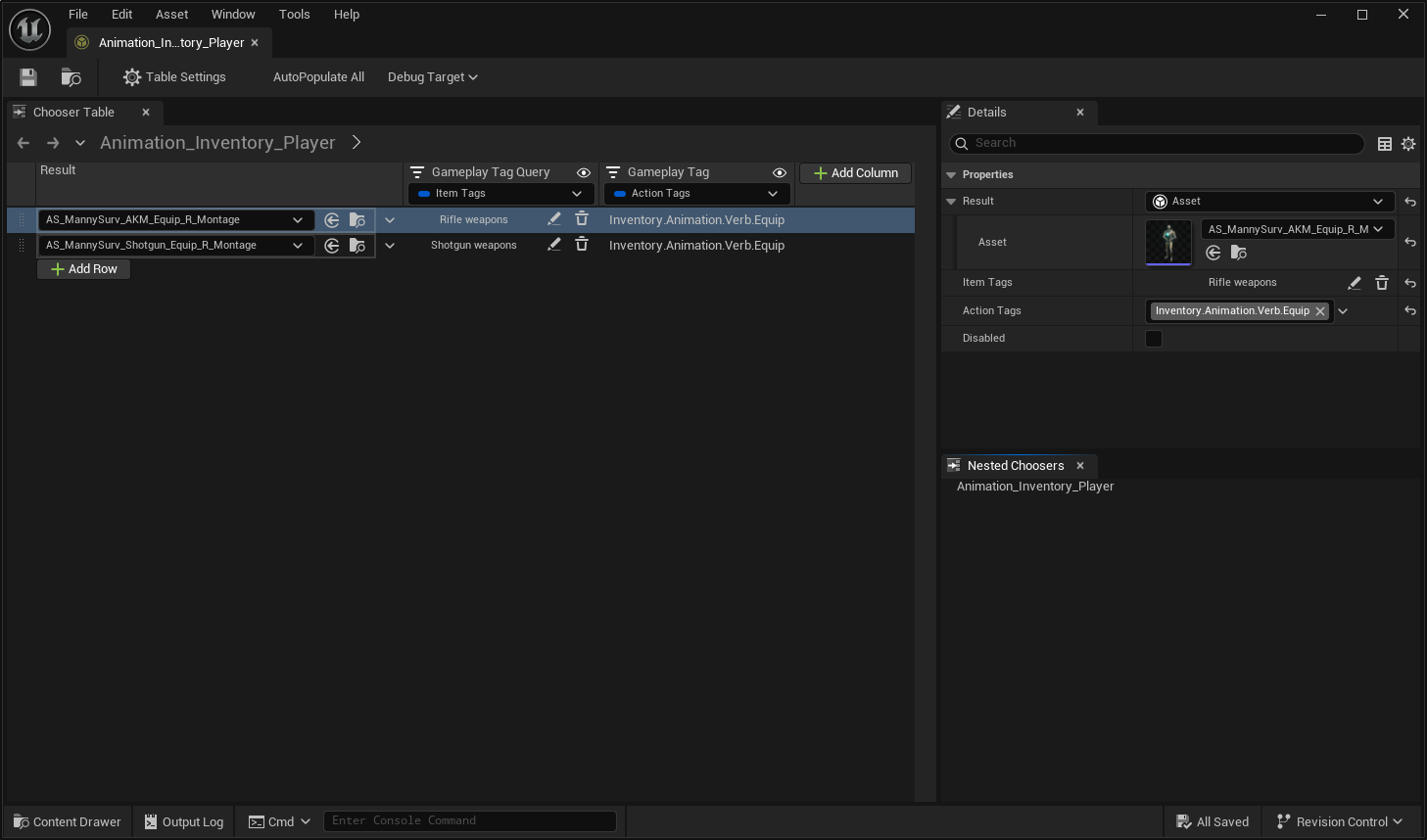
In the example above:
Item Tags use a Gameplay Tag Query, allowing multiple item types (e.g., rifles, shotguns) to share an animation.
Action Tags use a Tag Matcher, allowing animation selection specific to actions like equip.
Extending the Criteria
Because the criteria is a standard UObject, you can extend it with additional properties to support more advanced selection logic.
Enabling a Custom Animation Criteria
Create a Blueprint or C++ class that inherits from
NinjaInventoryAnimationCriteria.Add any custom parameters needed for your animation selection logic.
Assign the new class to
AnimationCriteriaClassin the Inventory Ability.Override
EnhanceAnimationCriteriain the ability (Blueprint or C++) to set criteria values.Update the Chooser Table to use the custom criteria class.