Casting Spells
Create the Cast Actor
In your Blueprints folder, create a new Cast Actor Blueprint using
NinjaCombatCastActoras the base class.Add two components to the Cast Sphere, a Niagara Component and an Audio Component. Set Auto Activate to
falsein both of them.In the My Blueprint tab, expand the list of Overridable Functions and select
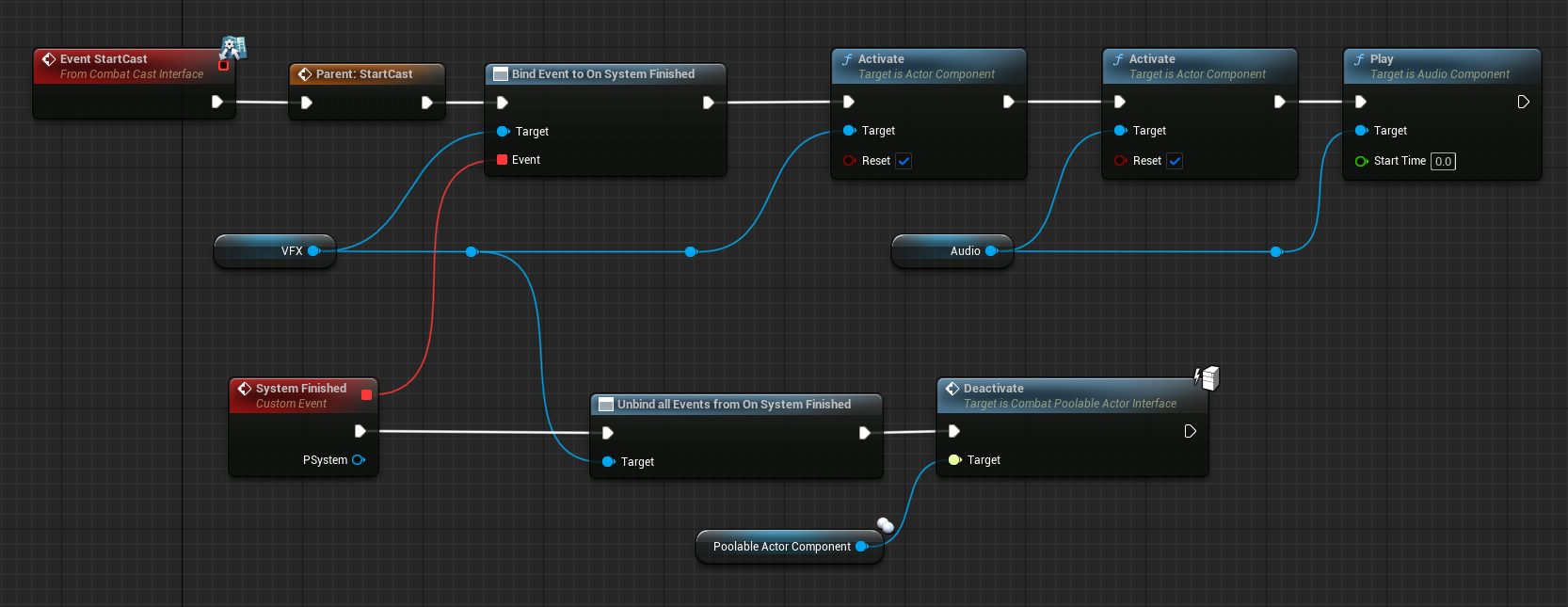
StartCast. This will add this event to the Event Graph.Right-click the new node and select Add Call to Parent Function. Connect that node to the event.
Bind a new event to the VFX's System Finished delegate, activate the VFX and Audio components, making sure that both are set to reset and then Play the audio.
In the System Finished Event, unbind the callback and deactivate the Poolable Actor, using the Poolable Actor Component.
17 April 2026