Motion Warping
Ninja Combat uses Motion Warping to adjust Root Motion during combat animations. This allows animations with fixed movement to adapt to combat targets, target positions, and desired facing rotations.
Motion Warping is especially useful for attacks, evades, finishers, and other movement-heavy abilities where the animation should stay authored, but still adapt to gameplay context.
For melee combat, Motion Warping is commonly used to help an attack connect with a target without over-reaching or falling short.
Animation Notify States
Animation-driven Motion Warping usually involves two Animation Notify States:
Notify State | Details |
|---|---|
Track Motion Warp Target | Resolves and tracks the combat warp target during the animation. It can use the Gameplay Targeting System to find eligible targets. |
Motion Warping | Configures how the warp will behave. Provided by Unreal Engine's Motion Warping module. Meant to be used in conjunction with the Motion Warping component. |
Motion Warping Interface
Ninja Combat interacts with Motion Warping through the CombatMotionWarpingInterface.
This interface abstracts the combat-specific operations needed by abilities, notify states, and gameplay code without requiring a specific component implementation.
Any Actor Component that implements this interface can be used as the combat Motion Warping provider.
Motion Warping Component
Ninja Combat provides NinjaCombatMotionWarpingComponent, which extends Unreal Engine's Motion Warping Component and implements CombatMotionWarpingInterface.
This component can be used as the default Motion Warping implementation for combat characters. It supports combat-specific warp target handling, target tracking, optimal melee distance adjustments, warp scaling, and debug visualization.
The default Motion Warping Component provided by Ninja Combat also provides the following features:
Feature | Details |
|---|---|
Transform Calculation | The target location and rotation can be extended by overriding |
Melee Attack Range | When warping melee attack animations, the ability's optimal distance is taken into consideration. |
Adjustment Threshold | Avoids small or unnecessary optimal-distance adjustments, using |
Warp Scale | You can scale the final warp value, per-axis, to fine-tune the warp effect, such as disabling vertical warping for large enemies. This can be done via |
Target Tracking | The warp target can be continuously tracked while the warp is active, allowing short attack windows to keep adjusting toward moving targets. |
Debug Mode | Enabling debug mode, per component, renders spheres and arrows that visually represent the warp location and rotation. |
Setting Warp Targets Directly
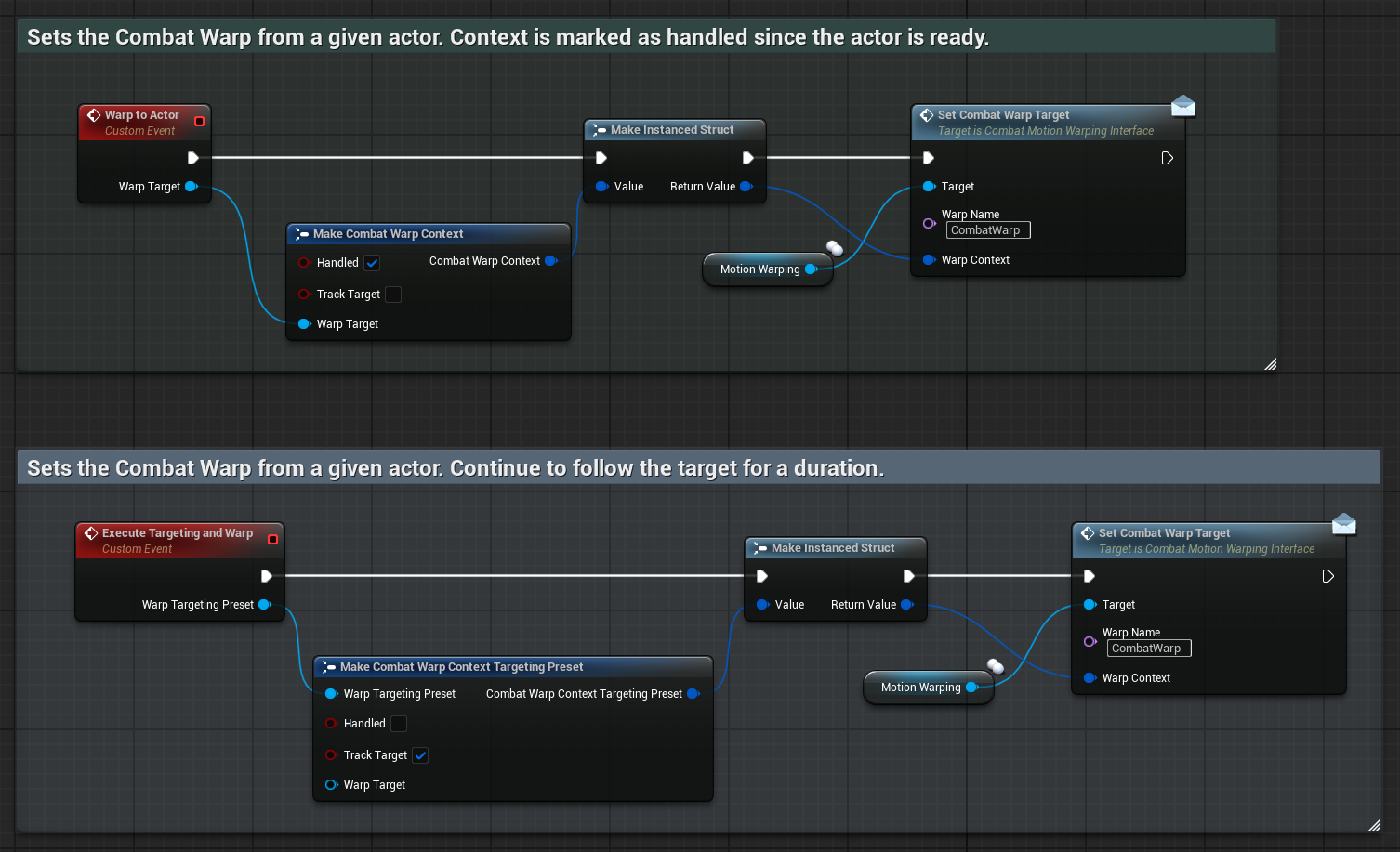
Warp targets can also be set directly through the Motion Warping Interface or Component. For that, you will commonly use an Instanced Struct that represents the Warp Context. Ninja Combat provides the following options:
Warp Context | Details |
|---|---|
Combat Warp Context | Default option that uses an Actor as the Warp Target. |
Targeting Preset Context | An option that collects the Actor using a Targeting Preset. |
You can derive your own struct from FCombatWarpContext, overriding attributes like target acquisition logic or validation rules. When sending contexts directly to the Motion Warping Component, the following attributes should be considered:
Attribute | Description |
|---|---|
Handled | Indicates that the actor set in the context is verified and ready to use. |
Track Target | Indicates that the actor's location should be continuously tracked while the warp is active. |
Tracking is useful for abilities that chase moving enemies for a few frames before contact.
Modifying Warp Calculations
The default Motion Warping Component calculates warp location and rotation using the CalculateWarpLocation and CalculateWarpRotation functions. These can be overridden to modify or completely replace the default behavior.
Additionally, you can fine-tune warp adjustments by customizing ApplyMeleeOptimalDistance and ApplyWarpLocationScale.
Function | Purpose |
|---|---|
| Calculates the final location used by the warp target. |
| Calculates the final rotation used by the warp target. |
| Adjusts melee warp locations using the ability's optimal distance. |
| Applies per-axis scaling to the final warp delta. |
Melee Optimal Distance
Some Combat Abilities define an optimal distance for execution. The Warp Component respects this by modifying the warp location only when the avatar is farther than that distance.
If the avatar is already within the optimal distance, the warp location remains unchanged by default.
To change this behavior and allow the avatar to be pushed back to exactly the optimal distance, enable the bAllowMeleePushback flag on the Motion Warping Component. When this flag is set, the warp will adjust the location even if the avatar is already too close.
To customize or extend this behavior, override the ApplyMeleeOptimalDistance function in Blueprints or C++.
Warp Location Scale
The default component includes a WarpScale property that scales the delta between the warp location and the avatar's current position.
This can be especially useful for axis adjustments, such as removing vertical offset on the Z-axis, to ensure the character remains grounded when warping.
To customize this logic, override the ApplyWarpLocationScale function in Blueprints or C++.
Debug Mode
To enable a visual representation of each warp target and calculation, enable Debug Mode in the component's Details Panel.
Debug Mode is useful when validating targeting presets, warp names, optimal distance behavior, target tracking, or custom warp calculation overrides.