Perception and Awareness
Ninja Bot introduces an extended Perception Component that builds on Unreal Engine's AI Perception system, introducing scoring and awareness behaviors. This component is automatically added and configured by the AI Controller provided by the framework, ensuring a consistent setup across all bots.
Rather than reacting directly to perception events, the Ninja Bot Perception Component evaluates sensed data explicitly. Its behavior is driven by data assets that define how senses are initialized, how their contributions are normalized, and how perceived information is interpreted over time.
The component relies on two primary configuration assets:
A Sense Data Asset, which defines the senses used by the bot, including which sense is considered dominant, along with optional strength normalization and curve-based modifiers
An optional Awareness Data Asset, which defines awareness thresholds and maps continuous awareness values to discrete awareness states
Together, these assets allow perception and awareness behavior to be reused, tuned, and extended without modifying code.
Perception and Awareness Data Flow
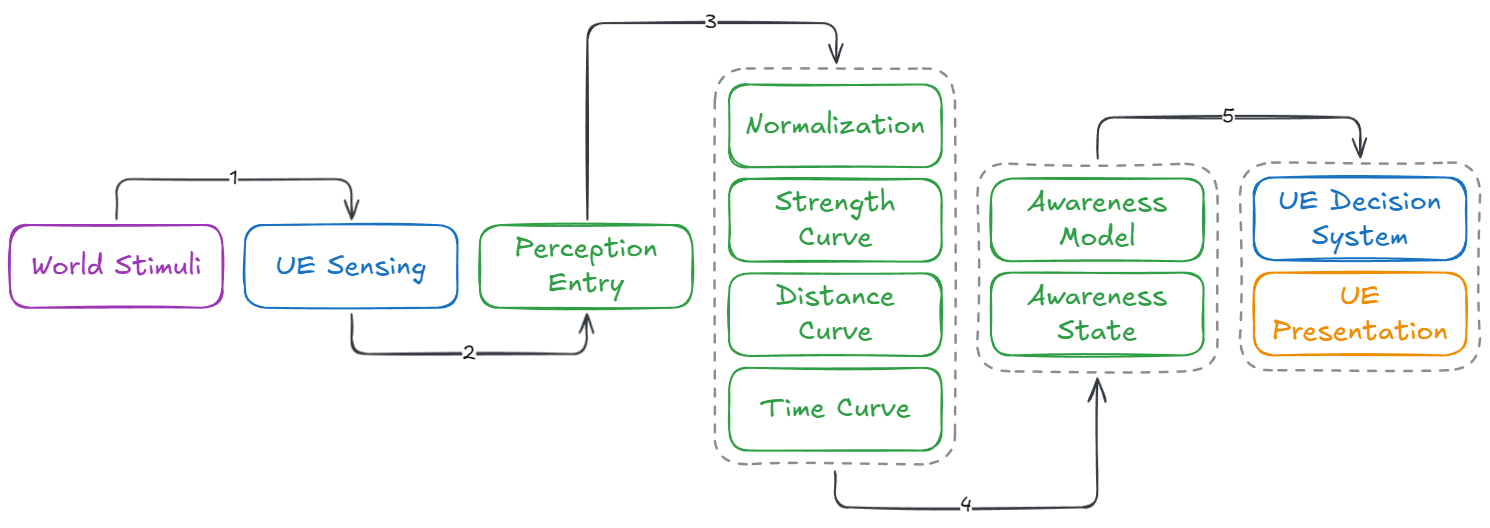
Ninja Bot evaluates sensory input in stages, separating detection, interpretation, and consumption. World stimuli are first sensed by Unreal Engine and aggregated per actor into perception entries.
Each sense is evaluated independently, normalized, and optionally shaped by distance, strength, and time-based modifiers to produce a unified perception score.
This score is accumulated over time into a continuous awareness value, which is then mapped to discrete awareness states. AI decision systems and presentation layers consume this interpreted awareness, ensuring that behavior and feedback are driven by stable, explainable state rather than raw perception events.
Sense Setup
Sense setup is responsible for defining how a bot detects and evaluates stimuli from the world. This includes which senses are active, how their raw input is normalized, and how each sense contributes to perception evaluation.
Sense Data Asset
The Sense Data Asset defines how a bot evaluates and compares sensed targets. It configures which senses are active, how their results are scored, and how targets compete for focus.
Creating a Sense Profile
A Sense Data Asset can be created in either of the following ways:
From the Content Browser: Ninja Bear Studio → Ninja Bot → Sense Profile
By creating a Data Asset directly from
UNinjaBotPerceptionSenseProfile
Sense Profile Properties
Property | Description |
|---|---|
Senses | Defines the set of active senses used by the bot, such as sight, hearing, or damage. Each entry configures how a specific sense is evaluated, scored, and contributes to perception. |
Dominant Sense | Specifies the sense that takes priority when multiple targets compete for focus. This is typically set to sight, but can be customized based on AI behavior. |
Min Switch Cooldown | Minimum time, in seconds, required between target switches. This prevents rapid focus flapping when multiple targets have similar scores. |
Min Score Delta To Steal | Absolute score difference required for a new target to steal focus from the current one. The new target's score must exceed the current target by at least this amount. |
Min Score Ratio To Steal | Relative score ratio required for a new target to steal focus. The new target's score divided by the current target's score must meet or exceed this ratio. |
Score Normalization | Optional normalization strategy applied to perception scores. When enabled, scores are normalized to a common range, allowing reliable comparison and external usage outside the perception system. |
The Sense Evaluation Settings structure defines how a single sense contributes to perception strength and awareness. Each entry represents one sense, such as sight, hearing, or damage, and controls how raw stimulus data is normalized, weighted, and optionally modified before being used for target evaluation.
Property | Description |
|---|---|
Sense | Sense configuration instance used by Unreal's AI Perception system. This defines how the sense detects stimuli but does not control how results are evaluated. |
Normalization | Class responsible for converting raw stimulus data into a normalized strength value. Different senses may use different normalization strategies depending on what “strength” means in their context. |
Base Weight | Base weight applied to the normalized sense strength before any curve-based multipliers are evaluated. Used to globally bias the importance of a sense relative to others. |
Max Normalized Strength | Upper bound applied to the normalized strength produced by this sense. Prevents a single sense from dominating the evaluation regardless of stimulus strength. |
Use Distance Multiplier | Enables the distance-based multiplier curve for this sense. |
Use Strength Response Curve | Enables the response shaping curve that modifies the normalized strength directly. |
Strength Response Curve | Optional curve applied directly to the normalized strength value. This is evaluated before weighting and other multipliers and can be used to exaggerate or suppress specific strength ranges. |
Distance Multiplier Curve | Optional curve applied based on the distance between the bot and the sensed target. The curve maps distance in Unreal units to a multiplier. |
Use Time Since Sensed Multiplier | Enables the time-based multiplier curve for this sense. |
Time Since Sensed Multiplier Curve | Optional curve applied based on the time elapsed since the sense last produced a valid stimulus. Useful for fading out stale sensory information. |
Awareness Mode | Defines how this sense contributes to awareness. Continuous senses increase awareness over time, while instant senses inject awareness immediately. |
Awareness Gain | Awareness value injected instantly when the sense produces a valid stimulus. Used only when the awareness mode is set to Instant. |
Awareness Weight | Multiplier applied when this sense contributes to continuous awareness gain. Used only when the awareness mode is set to Continuous. |
Curve Modifiers
Curve modifiers allow perception strength to be shaped dynamically based on context, rather than relying on raw stimulus values alone. They are optional, sense-specific, and evaluated as part of the perception strength calculation.
Each curve takes a contextual input value on the X axis and outputs a multiplier on the Y axis. This multiplier is applied during perception evaluation, allowing designers to emphasize, suppress, or delay how a sense contributes to the final perception score.
Ninja Bot supports three independent curve types:
Strength: X axis is the normalized sense strength and Y axis is the response multiplier
Distance: X axis is the distance in Unreal Units between the sensed actor and the sensor; Y axis is the multiplier applied to perception strength
Time Since Sensed: X axis is time in seconds since the stimulus was first sensed; Y axis is the multiplier applied to perception strength
Strength Response Curve
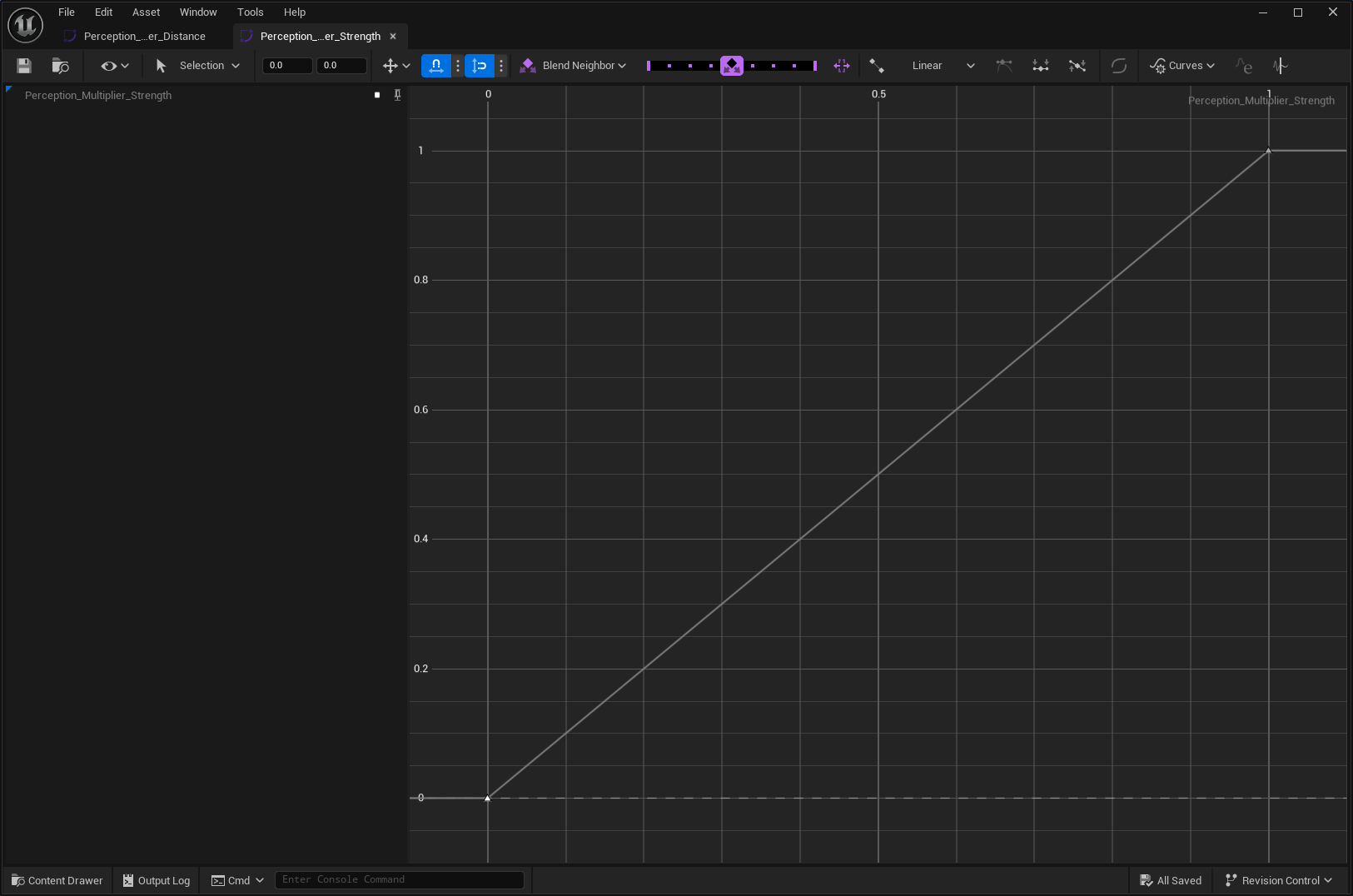
The Strength Response Curve directly modifies the normalized strength value produced by a sense. Unlike the other curves, this one does not depend on distance or time. It is applied immediately after normalization and before weighting, making it ideal for reshaping how strong a sense feels overall.
Because it operates directly on normalized strength, it is the most direct way to tune a sense's influence relative to others (e.g., damage contributes more to the final score calculation than other senses).
Typical use cases include:
Boost the importance of specific senses, such as damage
Compress or exaggerate certain strength ranges
Ensure that weak stimuli remain insignificant, even if frequent
Distance Multiplier Curve
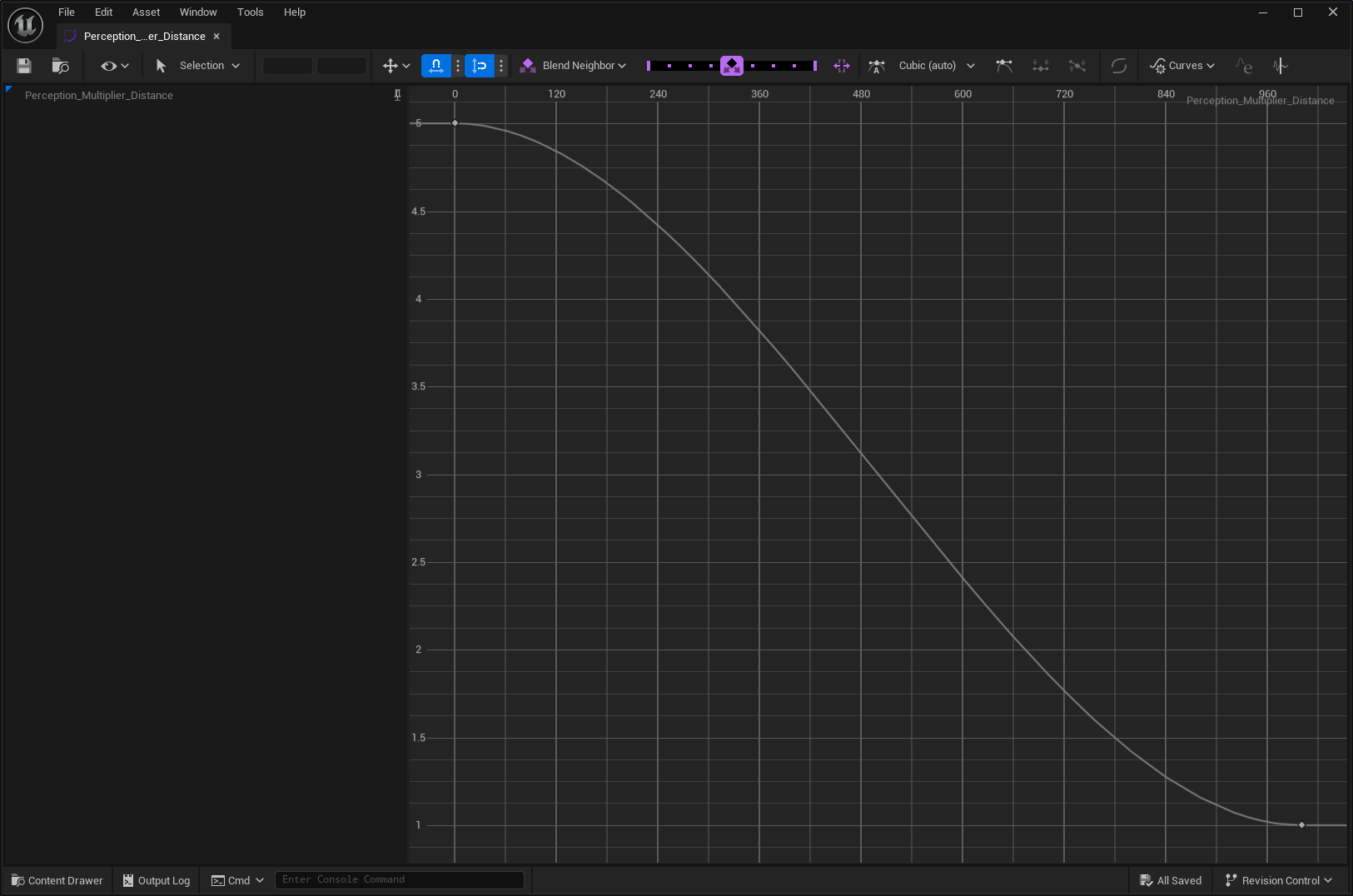
The Distance Multiplier Curve scales perception strength based on the distance between the AI agent and the sensed target.
In the example, the signal becomes stronger as the target gets closer to the agent. This is particularly useful for senses such as sight and hearing, where proximity naturally increases confidence and urgency.
Typical use cases include:
Making nearby targets more threatening than distant ones
Reducing long-range noise from weak or ambiguous stimuli
Biasing focus toward closer targets in combat encounters
Time Since Sensed Multiplier Curve
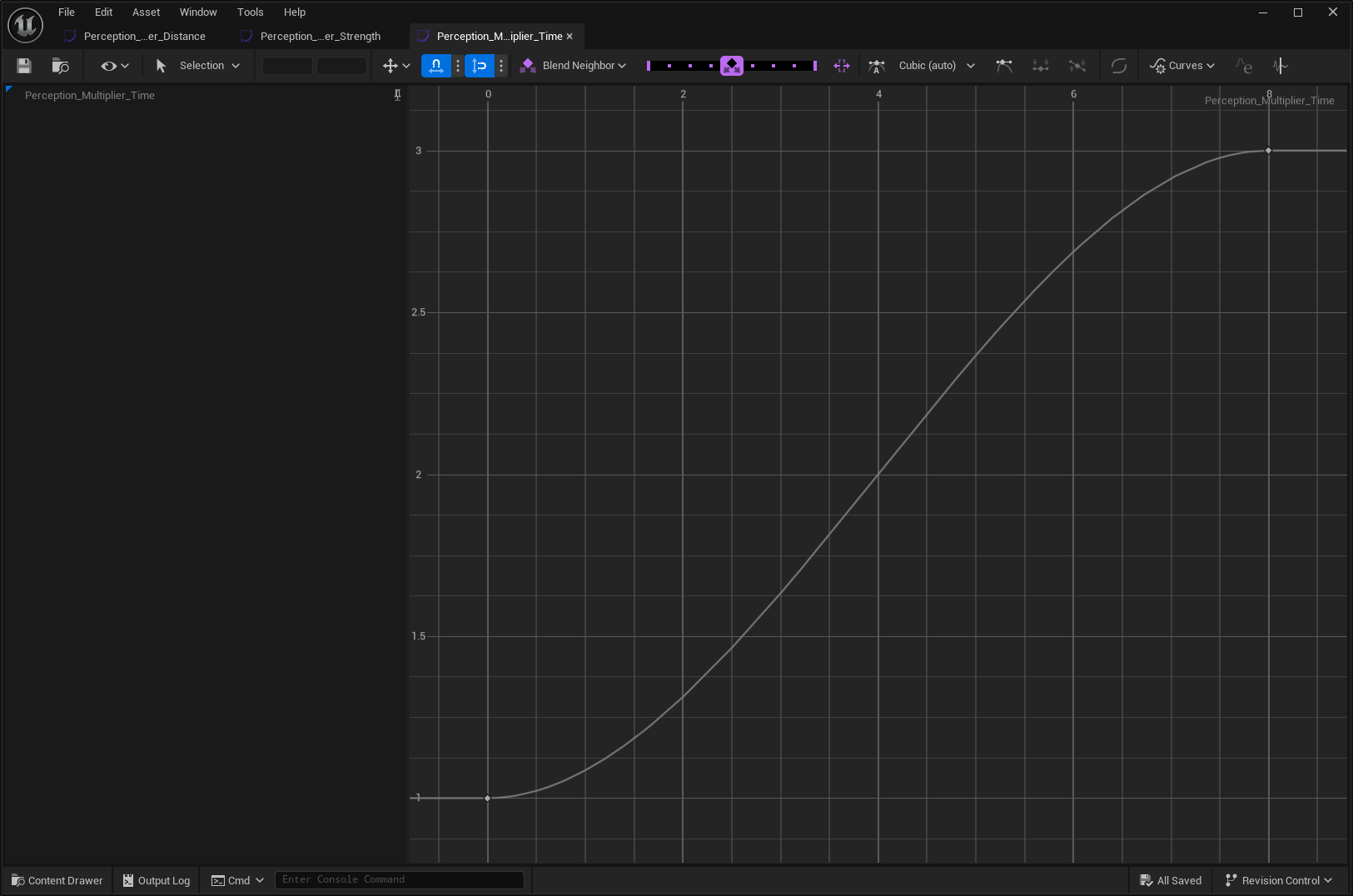
The Time Since Sensed Multiplier Curve scales perception strength based on how long the stimulus has been present.
In this example, the signal grows stronger as detection time increases. This can be used to simulate human-like reaction times, where awareness does not immediately spike on first contact.
By inverting or flattening the early part of the curve, it is also possible to make early detection weak or negligible, which is a good way to simulate reaction times (e.g., it takes 0.2 seconds for a human to react to sight).
Typical use cases include:
Delaying strong reactions to brief or transient stimuli
Gradually reinforcing sustained detection
Suppressing instant awareness for sight or hearing until confirmation or reaction time
Awareness Setup
Awareness setup defines how evaluated perception data is interpreted into a continuous awareness value and awareness states. It controls thresholds, gain behavior, and how bots transition between awareness levels.
Awareness Profile Data Asset
The Awareness Data Asset defines how an AI agent interprets evaluated perception data into awareness states over time. It controls how quickly awareness is gained, how it decays, and how continuous awareness values are mapped to awareness levels.
Creating an Awareness Profile
An Awareness Data Asset can be created in either of the following ways:
From the Content Browser: Ninja Bear Studio → Ninja Bot → Awareness Profile
By creating a Data Asset directly from
UNinjaBotPerceptionAwarenessProfile
Awareness States
When no Awareness Profile is assigned, an AI agent can only be in one of two states: Unaware and Aware. However, when an Awareness Profile is provided, the following awareness states become available:
Unaware: The AI has not detected anything unusual
Suspicious: The AI has detected weak or inconsistent signals
Alerted: The AI has strong and consistent indications that a target is nearby
Aware: The AI has fully confirmed the target's presence
These states are derived from a continuous awareness value in the range [0, 1], which is accumulated per sensed actor based on the normalized perception score produced by the Perception Component. Then, awareness is accumulated and decayed over time using the following model:
Awareness increases at a given gain rate, while at least one sense is actively detecting the target and providing a meaningful score.
Awareness decays at a given decay rate, when no valid stimuli are present or not providing a meaningful score.
Awareness Profile Properties
Property | Description |
|---|---|
Gain Rate | Awareness gained per second while at least one sense is actively detecting the target. This is not the time to reach full awareness, but a scaling factor applied to perception score over time. |
Decay Rate | Awareness lost per second when no senses are detecting the target. Lower values allow suspicion or alertness to linger after losing stimuli. |
Suspicious Threshold | Awareness value at which the AI transitions from Unaware to Suspicious. |
Alerted Threshold | Awareness value at which the AI transitions from Suspicious to Alerted. |
Aware Threshold | Awareness value at which the AI becomes fully Aware of the target. |
Notes:
Awareness gain depends on perception strength, but decay is time-based only.
Thresholds must be ordered logically to produce valid transitions.
Awareness profiles control interpretation, not sensing.
The same awareness profile can be reused across multiple bots for consistent behavior.