Movement Modes
While designing agent behavior, it is common to require changes in how an AI moves depending on context. Examples include walking while patrolling, running while chasing a target, or slowing down while investigating an area.
Ninja Bot supports this by introducing Movement Modes, which allow AI logic to express movement intent without directly manipulating movement components.
Defining Movement Modes
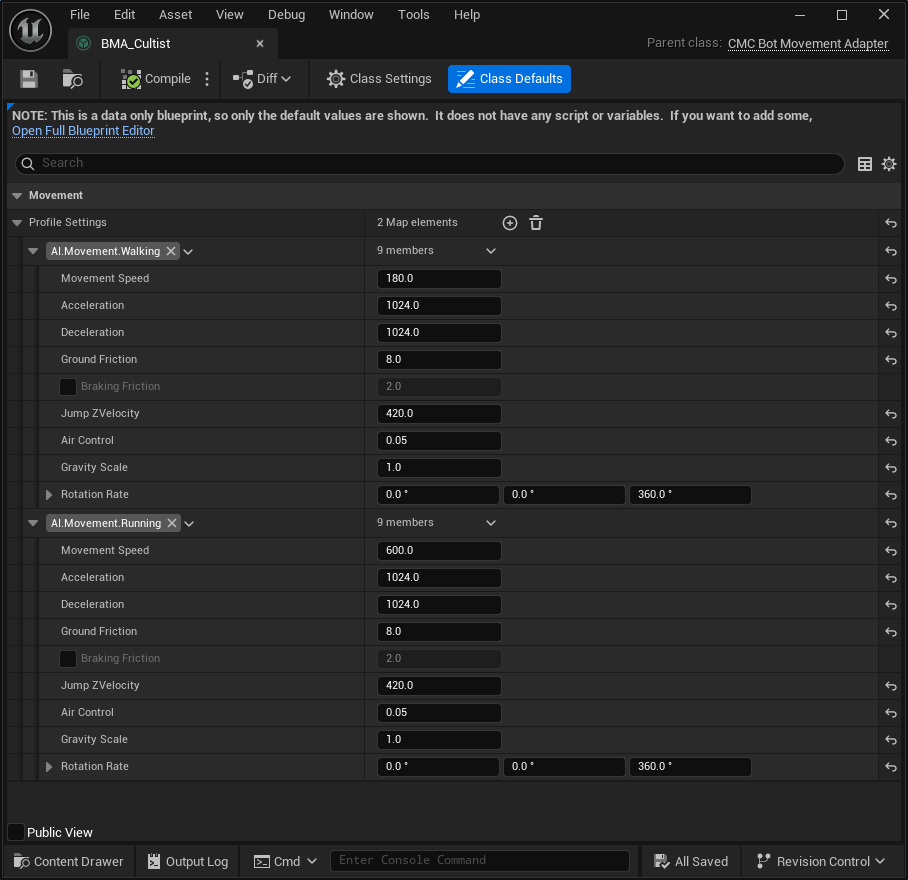
Movement modes are implemented by creating a Movement Adapter Blueprint. A Movement Adapter can be created from the Content Browser's contextual menu: Ninja Bear Studio → Ninja Bot → Bot Movement Adapter.
When creating the asset, select the desired base adapter class. The resulting Blueprint defines how movement modes are interpreted and applied.
The Movement Adapter Blueprint is then assigned to the Bot Data Asset, which is loaded by the AI Controller during initialization. Once defined, movement modes can be activated through the Set Movement tasks available to both Behavior Trees and State Trees.
Changing Movement Modes
Movement modes can be changed by Behavior or State Trees using the provided task, Set Movement and providing the Gameplay Tag that maps to the desired Movement Mode.
Movement Adapters
Movement mode changes are applied through the Movement Adapter set to the Bot Data Asset. The adapter acts as a translation layer between the abstract movement mode and the concrete movement system used by the pawn.
By default, Ninja Bot provides a Character Movement Component–compatible adapter (CMC Bot Movement Adapter). This implementation exposes commonly used movement properties, including: movement speed, acceleration, deceleration, rotation rate, etc.
Custom Implementations
Projects can implement custom movement behavior by subclassing UNinjaBotMovementAdapter. Creating a custom adapter typically involves defining how movement mode tags are translated into concrete settings applied to an underlying movement system.
Implementing a Custom Movement Adapter
Create a struct containing all properties that can be modified by a movement mode.
Create a subclass or Blueprint extending
UNinjaBotMovementAdapter.In the adapter, define a map of Gameplay Tags to the struct, representing the available movement modes.
Override
SetMovementto resolve the requested Movement Mode tag and apply the corresponding settings to the underlying movement system.